
Searching for the best 2in1 laptops in 2026? The top models balance flexibility, performance, and portability, but each has its own strengths and tradeoffs. The Lenovo Yoga 7 stands out for its crisp OLED display and strong specs, making it ideal for creative users. The HP EliteBook x360 1040 G11 offers premium build quality and power for professionals, while budget-friendly options like the Lenovo IdeaPad Flex 3i Chromebook bring convertible versatility at a lower price. Choosing the right 2in1 depends on your priorities—performance, price, or portability. Continue reading for an in-depth breakdown of each option.

Get business pricing on tech for your team
- Business-only prices and quantity discounts
- Tax-exempt purchasing
- Multiple users, one account, clear invoices
Key Takeaways
- High-end models like the HP EliteBook x360 and Lenovo Yoga 7 deliver premium performance and build quality, but come with a higher price tag.
- Chromebooks and budget options, such as the IdeaPad Flex 3i and Chromebook x360, excel in portability and affordability but may lack power for demanding tasks.
- Display quality varies significantly; OLED screens like in the Yoga 7 offer richer visuals, while some models use standard FHD panels.
- Memory and storage configurations are crucial—models with 16GB RAM and large SSDs support multitasking and storage needs.
- The tradeoff between weight and durability is evident—lighter models are more portable but may compromise on robustness.




| 2in1 laptop | Display | Processor | RAM | Storage |
|---|---|---|---|---|
| Lenovo IdeaPad Flex 3i Chromeb | 12.2" WUXGA IPS touchscreen, 1920×1200 | Intel N100 (4 cores, up to 3.4GHz) | 4GB LPDDR5 | 64GB eMMC + 64GB SD Card |
| HP EliteBook x360 1040 G11 14- | 14-inch 2.8K OLED Touchscreen | Intel Ultra 7 155H vPro | 32GB DDR5 | 1TB SSD |
| Lenovo Yoga 7 2-in-1 Laptop 14 | 14" WUXGA OLED (1920×1200), 600nits | AMD Ryzen AI 5 340 | 16GB LPDDR5x | 1TB SSD |
| HP OmniBook X Flip Copilot+ PC | 16-inch WUXGA 2K IPS Touchscreen | AMD Ryzen AI 5 340 | 16GB LPDDR5 | 512GB PCIe Gen4 SSD |
| Dell Latitude 5300 2-in-1 13.3 | 13.3" FHD Touchscreen | 8th Gen Core i5-8365U | 16GB DDR4 | 256GB SSD |
| HP Chromebook x360 14-inch FHD | 14 inch FHD IPS touchscreen | Intel Processor N100 | 4 GB LPDDR5 | 64 GB eMMC |
| HP 14 2-in-1 Chromebook 14-inc | 14-inch FHD IPS touchscreen | Intel N100 quad-core | 4GB DDR5 | 64GB |
| Dell Latitude 7390 13.3" FHD T | 13.3-inch FHD Touchscreen | Intel Core i7-8650U | 16GB DDR4 | 1TB NVMe SSD |
| 15.6-inch Yoga 2-in-1 Touchscr | 15.6-inch FHD IPS Touchscreen | AMD A9 up to 3.2GHz | 8GB | 256GB SSD |
| Dell Latitude 5320 2-in-1 13.3 | 13.3" FHD (1920×1080) | Intel Core i7-1185G7, 3.0 GHz up to 4.8 GHz | 32GB | 512GB SSD |
| Dell Latitude 3190 11.6" HD 2- | 11.6" HD (1366 x 768) | Intel N5030, 1.1GHz (up to 2.4GHz) | 4GB DDR4 | 128GB SSD |
| Lenovo Chromebook 2-in-1 | 14" WUXGA IPS Touchscreen | Intel® N150 CPU | 4GB | 128GB UFS |
| QAZIPO 2-in-1 Laptop Tablet wi | 12-inch 2K IPS Touchscreen | Intel Pentium Gold 6500Y | 12GB | 512GB SSD |
More Details on Our Top Picks
Lenovo IdeaPad Flex 3i Chromebook 2-in-1 Laptop (12.2″ FHD+ Touchscreen, Intel N100, 4GB RAM, 64GB eMMC + 64GB SD Card) for Home & Students, NFC, Lightweight, Long Battery Life, Chrome OS, Blue
This Chromebook stands out for its ultra-lightweight design and impressive battery life, making it perfect for students and home users who prioritize mobility over raw power. Compared with the Dell Latitude 5300, it offers a more affordable option, but its 4GB RAM limits multitasking potential, especially with heavier Chrome tabs or apps. The 12.2-inch touchscreen provides sufficient space for casual use, while the inclusion of NFC adds convenience for quick device pairing. However, the limited storage and basic speakers mean it’s less suited for media-heavy tasks or extensive file storage. This pick makes the most sense for users who need a straightforward, portable device for browsing, streaming, and light productivity without breaking the bank.
Pros:- Extremely lightweight and portable at just 2.76 lbs
- Long-lasting battery life up to 12 hours
- Versatile 2-in-1 design with multiple modes
- Fast Wi-Fi 6 and NFC for quick connectivity
Cons:- Limited 4GB RAM may hinder multitasking with multiple applications
- Storage capacity is modest for large files or media collections
- Built-in speakers are basic and may lack depth
Best for: Students or casual home users seeking an affordable, portable 2-in-1 Chromebook for everyday tasks
Not ideal for: Power users or professionals who require extensive multitasking or high storage capacity
- Display:12.2″ WUXGA IPS touchscreen, 1920×1200
- Processor:Intel N100 (4 cores, up to 3.4GHz)
- Graphics:Intel UHD Graphics
- RAM:4GB LPDDR5
- Storage:64GB eMMC + 64GB SD Card
- Battery:47Wh, up to 12 hours
- Weight:2.76 lbs
- Connectivity:Wi-Fi 6, Bluetooth 5.3, NFC
- Ports:USB-C, 2× USB-A, HDMI 1.4, microSD, headphone/mic
Our verdict“This Chromebook is ideal for students and casual users prioritizing portability and affordability over power.”
HP EliteBook x360 1040 G11 14-Inch 2-in-1 Laptop with 32GB RAM and 1TB SSD
This model excels for enterprise users and creators thanks to its 14-inch 2.8K OLED display and high-end specs like 32GB DDR5 RAM and a 1TB SSD, offering exceptional performance and vivid visuals. Compared with the Lenovo Yoga 7, it provides more raw power and security features, but at a significantly higher price and weight, making portability a compromise. Its 360-degree hinge supports multiple modes, ideal for presentations and creative work, while the enterprise-grade security features add peace of mind. The OLED screen’s vibrant colors are perfect for media editing, but the premium price tag and increased weight may deter casual users or those with tighter budgets. This laptop makes the most sense for professionals who need a secure, high-performance 2-in-1 for demanding tasks and mobile work environments.
Pros:- High-performance with 32GB DDR5 RAM and 1TB SSD
- Vivid 14-inch 2.8K OLED touchscreen for media work
- Enhanced security features suitable for enterprise use
- Multiple modes with a flexible 360-degree hinge
Cons:- Heavy and less portable compared to smaller ultrabooks
- Premium price may be prohibitive for some buyers
- Resealed upgrade may impact warranty perception
Best for: Business professionals or creators needing high performance, security, and a vibrant display
Not ideal for: Casual users or students seeking a lightweight, budget-friendly device
- Display:14-inch 2.8K OLED Touchscreen
- Processor:Intel Ultra 7 155H vPro
- RAM:32GB DDR5
- Storage:1TB SSD
- Graphics:Intel Arc integrated
- Battery Life:up to 14 hours
Our verdict“This laptop is best suited for professionals who prioritize power, security, and display quality over portability.”
Lenovo Yoga 7 2-in-1 Laptop 14AKP10 with AMD Ryzen AI 5 340, 14″ OLED Touch Display, 16GB RAM, 1TB SSD, Windows 11 Home
This Lenovo Yoga offers a vibrant OLED display, a capable AMD Ryzen AI 5 processor, and 16GB RAM, making it perfect for creative tasks and multitasking on the go. Compared with the HP OmniBook X Flip, it provides a more affordable yet equally high-quality OLED experience, though it lacks the ultra-long battery life of the larger HP. The 14-inch OLED screen offers deep contrast and color accuracy, great for photo editing or media consumption, while the lightweight design enhances portability. Its 60Hz refresh rate may be limiting for gamers or high-speed video editing, but for most productivity and creative work, it performs admirably. The slightly lower battery life and higher price compared to traditional laptops are the main tradeoffs. This pick is ideal for creators who need a versatile, visually stunning device for both work and entertainment.
Pros:- Vibrant OLED touchscreen with deep contrast
- Powerful AMD Ryzen AI 5 processor for multitasking
- Lightweight and sleek for portability
- Supports fast charging with Rapid Charge Express
Cons:- Limited to 60Hz refresh rate, not ideal for gaming
- Battery life details are not specified
- Premium features come at a higher cost
Best for: Creative professionals and multitaskers seeking high-quality visuals and portability
Not ideal for: Gamer or users demanding high refresh rates or extended battery life
- Display:14″ WUXGA OLED (1920×1200), 600nits
- Processor:AMD Ryzen AI 5 340
- RAM:16GB LPDDR5x
- Storage:1TB SSD
- Graphics:Integrated AMD Radeon 840M
- Battery:70Wh, supports Rapid Charge
Our verdict“This device is perfect for creators and multitaskers who want a high-quality display in a portable form factor.”
HP OmniBook X Flip Copilot+ PC 16-inch 2-in-1 Touch Laptop
The HP OmniBook X Flip Copilot+ offers a large 16-inch 2K IPS touchscreen, making it ideal for media consumption and productivity. Its impressive 21-hour battery life and AI-enhanced camera and audio set it apart for users who need all-day use and multimedia capabilities. Compared with the Dell Latitude 5320, it provides a larger display and longer battery life but at a higher price and slightly bulkier design. The recycled metal design emphasizes sustainability, and the AI features improve video and audio quality. The premium price and focus on media and eco-friendly features make this less suitable for budget-conscious buyers or those needing a compact device. This model makes the most sense for professionals who want a large, versatile 2-in-1 with excellent battery longevity and multimedia features.
Pros:- Long battery life up to 21 hours
- Large 16-inch 2K touchscreen with vivid display
- AI-enhanced camera and audio for better multimedia experience
- Eco-friendly design with recycled materials
Cons:- Premium price point limits accessibility
- Relatively bulky for frequent travelers
- Windows 11 Home may lack advanced management features
Best for: Media-heavy users and professionals needing all-day battery life in a large, versatile device
Not ideal for: Travelers or users seeking a compact, lightweight 2-in-1 for portability
- Display:16-inch WUXGA 2K IPS Touchscreen
- Processor:AMD Ryzen AI 5 340
- RAM:16GB LPDDR5
- Storage:512GB PCIe Gen4 SSD
- Operating System:Windows 11 Home
- Battery Life:Up to 21 hours
Our verdict“This laptop suits users who need a large, durable device with exceptional battery life for multimedia and all-day productivity.”
Dell Latitude 5300 2-in-1 13.3″ FHD Touchscreen Laptop – Core i5, 16GB RAM, 256GB SSD, Windows 11 Pro (Renewed)
This Dell Latitude offers a compact 13.3-inch display combined with a 8th Gen Core i5 processor and 16GB RAM, making it a reliable choice for mobile professionals. Compared with the HP EliteBook x360, it provides a more affordable, lightweight option with strong multitasking capabilities. Its 2-in-1 form factor allows seamless transitions between tablet and laptop modes, perfect for on-the-go productivity. The Windows 11 Pro ensures better security and device management, ideal for enterprise environments. However, as a renewed product, it may have warranty limitations, and its integrated graphics are not suited for gaming or high-end media editing. The battery life is not specified, which might be a concern for all-day use. This device is best for business users who need a portable, secure, and versatile device for everyday work.
Pros:- Powerful 8th Gen Core i5 processor for multitasking
- High-capacity 16GB RAM ensures smooth performance
- Lightweight and easy to carry at under 1.5kg
- Versatile 2-in-1 touchscreen for productivity and media
Cons:- Renewed product may have warranty and reliability concerns
- Limited storage of 256GB SSD can be restrictive
- Integrated graphics not suitable for demanding media tasks
Best for: Business travelers and professionals requiring a secure, portable 2-in-1 with solid multitasking
Not ideal for: Gamer or multimedia creators needing high-end graphics or extended battery details
- Processor:8th Gen Core i5-8365U
- Display:13.3″ FHD Touchscreen
- RAM:16GB DDR4
- Storage:256GB SSD
- Weight:1.42kg
- Operating System:Windows 11 Pro
Our verdict“This device is well-suited for mobile professionals needing a reliable, secure, and portable 2-in-1 for everyday business tasks.”
HP Chromebook x360 14-inch FHD IPS Touch 2-in-1 Laptop
This HP Chromebook x360 stands out for its balanced combination of a 14-inch Full HD IPS touchscreen and a flexible 2-in-1 design, making it ideal for students and casual users who need portability and all-day battery life. Compared to the Dell Latitude 7390, it offers significantly longer battery life but falls short in processing power, limiting multitasking and intensive tasks. The 4GB RAM and 64GB eMMC storage are sufficient for light use but may require external storage or cloud solutions for larger files. Its lightweight build enhances portability, while the Intel N100 processor keeps performance modest. This pick is best suited for users prioritizing mobility and daily browsing over heavy multitasking or media editing. However, power users needing robust performance may find the specs limiting. Ideal for students, commuters, or light-duty users who want a reliable, long-lasting Chromebook with a convertible display.
Pros:- Versatile 2-in-1 touchscreen design
- Long battery life of over 10 hours
- Lightweight and easy to carry
Cons:- Limited 64GB storage may require external solutions
- Only 4GB RAM could hinder multitasking performance
- Processor might struggle with intensive tasks
Best for: Students or casual users seeking a portable, long-lasting Chromebook for everyday tasks
Not ideal for: Power users or professionals needing high performance for demanding applications
- Processor:Intel Processor N100
- Display:14 inch FHD IPS touchscreen
- RAM:4 GB LPDDR5
- Storage:64 GB eMMC
- Battery Life:Up to 10 hours and 15 minutes
- Weight:Lightweight and portable
Our verdict“A strong choice for everyday portability and battery life, especially for students and light users.”
HP 14 2-in-1 Chromebook 14-inch FHD Touchscreen (Renewed)
This renewed HP 14-inch Chromebook offers a flexible 360-degree flip touchscreen, making it well-suited for students and casual users who want a compact, convertible device. Its Intel N100 quad-core processor, combined with 4GB RAM and 64GB storage, provides smooth performance for browsing, streaming, and light productivity, rivaling the Lenovo IdeaPad Flex 3i but with the added advantage of Wi-Fi 6 and Bluetooth 5 for faster connectivity. The 14-inch Full HD IPS display ensures clear visuals, and the lightweight design enhances portability. However, the limited storage capacity may be restrictive for larger files or apps, and the processor might not handle demanding multitasking well. This device is best for those who prioritize convertible design and modern connectivity in a budget-friendly, renewed package. It’s less suitable for power users or heavy multitaskers. Ideal for students or on-the-go users who need a reliable, convertible Chromebook with fast wireless connectivity.
Pros:- Convertible 2-in-1 design with touchscreen
- Fast Wi-Fi 6 and Bluetooth 5 connectivity
- Lightweight and portable for mobility
- Renewed product with reliable performance
Cons:- Limited 64GB storage may require external solutions
- Only 4GB RAM could impact multitasking
- Processor may be less capable for demanding tasks
Best for: Students or casual users seeking a portable, affordable convertible Chromebook with modern connectivity
Not ideal for: Power users or professionals needing extensive storage and high multitasking capacity
- Display:14-inch FHD IPS touchscreen
- Processor:Intel N100 quad-core
- RAM:4GB DDR5
- Storage:64GB
- Connectivity:Wi-Fi 6, Bluetooth 5
- Webcam:720p with dual microphones
Our verdict“A solid, portable convertible Chromebook ideal for students and casual users on a budget.”
Dell Latitude 7390 13.3″ FHD Touch 2-in-1 Laptop, Intel Core i7-8650U, 16GB RAM, 1TB SSD, Windows 11 Pro (Renewed)
This Dell Latitude 7390 excels for business users who need a compact yet powerful device. Its 13.3-inch FHD touchscreen with anti-reflective coating provides clear visuals with reduced eye strain, outperforming both Chromebooks and lower-spec models like the HP Chromebook x360. Equipped with an Intel Core i7-8650U processor and 16GB RAM, it handles multitasking, demanding applications, and media editing with ease. The 1TB SSD ensures ample fast storage, making it a top choice for professionals who need performance in a portable form factor. Connectivity options like USB-C with DisplayPort, HDMI, and Windows 11 Pro make it versatile for work environments. The main tradeoff is its higher price and the uncertainty of battery life in a renewed unit. This model is best for power users who want a premium 2-in-1 with excellent performance. It’s less suited for budget-conscious buyers or those prioritizing battery longevity over raw power. Ideal for professionals who need a portable, high-performance device with business-class features.
Pros:- High-performance Intel Core i7 processor
- Large 1TB SSD for fast storage
- Anti-reflective touchscreen reduces eye strain
- Multiple connectivity options including USB-C and HDMI
Cons:- Renewed product may have limited warranty
- Higher price point compared to other options
- Battery life details are unspecified
Best for: Business professionals or power users requiring a high-performance, portable 2-in-1
Not ideal for: Budget-conscious consumers or casual users needing basic functionality
- Display:13.3-inch FHD Touchscreen
- Processor:Intel Core i7-8650U
- RAM:16GB DDR4
- Storage:1TB NVMe SSD
- Connectivity:DisplayPort via USB-C, HDMI, Wi-Fi, Bluetooth
- Operating System:Windows 11 Pro
Our verdict“A premium choice for professionals demanding power, portability, and versatility in a 2-in-1.”
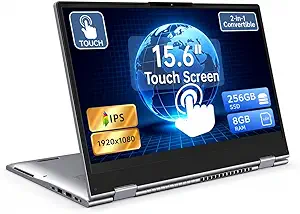
15.6-inch Yoga 2-in-1 Touchscreen Laptop with AMD A9 Processor, 8GB RAM, 256GB SSD
This Lenovo Yoga offers a spacious 15.6-inch Full HD IPS touchscreen with flexible 2-in-1 capability, making it suitable for multimedia consumption and light productivity. Its AMD A9 processor, combined with 8GB RAM and 256GB SSD, surpasses entry-level options in multitasking ability and storage, making it a good mid-range choice. The larger screen provides an immersive experience, especially for entertainment and creative tasks. Compared to the smaller HP Chromebook x360, it offers more power and storage but at a higher weight and potentially shorter battery life. The device’s flexible hinge allows seamless switching between laptop and tablet modes, while the Windows 11 OS enhances usability. Its main tradeoff is the less powerful AMD A9 chip, which can struggle with demanding applications, and the battery life may not match smaller, lighter models. This model is best for users who want a bigger display for media and light work, but not for intensive tasks. Ideal for media lovers and students who need a larger, versatile touchscreen device with decent performance.
Pros:- Large 15.6-inch Full HD IPS display
- Flexible 2-in-1 convertible design
- Fast 256GB SSD for storage and responsiveness
- Responsive touchscreen with wide viewing angles
Cons:- Processor may be less capable for intensive tasks
- Heavier and potentially shorter battery life compared to smaller models
- Out-of-the-box storage may be limiting for some users
Best for: Media consumers or students needing a larger screen for multitasking and entertainment
Not ideal for: Power users or professionals requiring high-end processing and battery longevity
- Display:15.6-inch FHD IPS Touchscreen
- Processor:AMD A9 up to 3.2GHz
- RAM:8GB
- Storage:256GB SSD
- Graphics:Radeon R5
- Connectivity:USB-C, USB 3.0 x 2, HDMI
Our verdict“A great option for media enthusiasts and students who want a bigger screen and flexible use but don’t require high-end processing.”
Dell Latitude 5320 2-in-1 13.3″ FHD Touchscreen Laptop, Intel i7, 32GB RAM, 512GB SSD, Windows 11 Pro (Renewed)
This Dell Latitude 5320 stands out for combining powerful performance with enterprise-grade security and manageability, making it ideal for professionals who need reliability and speed. Its Intel i7 processor and 32GB RAM ensure seamless multitasking, outperforming models like the QAZIPO 2-in-1 in raw speed, though it lacks a dedicated GPU for graphics-intensive tasks. The 13.3″ FHD touchscreen offers crisp visuals, perfect for productivity, but as a renewed product, potential buyers should consider the limited warranty and unknown battery life. Compared to the Lenovo Chromebook, it provides more robust performance but at a higher cost. This pick makes the most sense for business users who prioritize security and performance over portability or budget constraints.
Pros:- Powerful Intel i7 processor with fast multitasking capabilities
- Large 32GB RAM for intensive productivity
- High-resolution 13.3″ FHD touchscreen for clarity
- Secure with Windows 11 Pro management features
Cons:- Renewed product may have limited warranty and unknown battery life
- No dedicated GPU for graphics-heavy applications
Best for: Business professionals requiring high performance, security features, and enterprise management capabilities.
Not ideal for: Casual users or students seeking lightweight, affordable devices with longer battery life for everyday tasks.
- Display:13.3″ FHD (1920×1080)
- Processor:Intel Core i7-1185G7, 3.0 GHz up to 4.8 GHz
- RAM:32GB
- Storage:512GB SSD
- Operating System:Windows 11 Pro
- Ports:2 x USB 3.2 Gen 1, 1 x USB 3.2 Gen2 Type-C, HDMI, headphone jack, power port
Our verdict“This model is best suited for professionals who need serious performance and security features in a portable business device.”
Dell Latitude 3190 11.6″ HD 2-in-1 Touchscreen Laptop with Intel N5030, 4GB RAM, 128GB SSD, Windows 11 Pro (Renewed)
This Dell Latitude 3190 excels in portability, thanks to its compact 11.6-inch size and lightweight design, making it a strong choice for students or on-the-go workers who value mobility. Its Intel N5030 processor and 4GB RAM deliver sufficient performance for basic tasks but fall short against the QAZIPO 2-in-1 in multitasking, especially with only 4GB of RAM. The Windows 11 Pro enhances usability, but the device’s HD resolution and limited RAM may hinder productivity for heavier workloads. Compared with the Lenovo Chromebook, this offers a traditional Windows experience at a slightly higher price and with less focus on durability. This makes sense for users prioritizing portability and basic functionality over heavy multitasking or high-resolution screens.
Pros:- Extremely lightweight and compact for easy portability
- Touchscreen display improves usability
- Windows 11 Pro provides familiar OS experience
- Multiple connectivity options including HDMI
Cons:- Limited 4GB RAM restricts multitasking
- HD resolution may not satisfy users needing sharp visuals
- Renewed product could have reduced durability
Best for: Students or mobile professionals needing a lightweight, Windows-based device for casual use and note-taking.
Not ideal for: Power users or creative professionals requiring more RAM, higher resolution, or graphics capabilities.
- Display:11.6″ HD (1366 x 768)
- Processor:Intel N5030, 1.1GHz (up to 2.4GHz)
- RAM:4GB DDR4
- Storage:128GB SSD
- Operating System:Windows 11 Pro
- Ports:Combo headphone/microphone jack, HDMI, 2 USB 3.1 Gen 1
Our verdict“This device is ideal for users who need a portable Windows laptop for light tasks and basic browsing, but not for demanding workloads.”
Lenovo Chromebook 2-in-1 – Lightweight Laptop with Touchscreen and Google Gemini
This Lenovo Chromebook offers a solid balance of portability and functionality, especially for users who prefer Chrome OS. Its 14″ WUXGA IPS touchscreen provides sharper visuals than comparable smaller devices, and the Intel N150 CPU with 4GB RAM ensures decent performance for browsing, streaming, and light productivity. Compared to the Dell Latitude 3190, it’s less powerful but more affordable, with the added benefit of a durable, military-grade build. The device’s long battery life and lightweight form factor make it ideal for students or casual users, though the processor and RAM limit its ability to handle intensive multitasking or creative work. This pick is best suited for those seeking a simple, durable device for everyday use, not demanding workloads.
Pros:- Lightweight and durable design for portability
- Vivid 14″ WUXGA IPS touchscreen
- Long-lasting battery life
- Versatile 2-in-1 convertible form factor
Cons:- Limited to 4GB RAM, affecting multitasking
- Processor may be underpowered for intensive applications
- Battery life duration is not specified
Best for: Students or casual users who need a durable, portable device for browsing, streaming, and light tasks at a low cost.
Not ideal for: Power users or professionals requiring Windows-based software or higher performance for demanding tasks.
- Display:14″ WUXGA IPS Touchscreen
- Processor:Intel® N150 CPU
- RAM:4GB
- Storage:128GB UFS
- Weight:3.3 lbs
- Ports:2 USB-C, 2 USB-A, HDMI
Our verdict“This Chromebook is best for budget-conscious users needing a durable, portable device for light tasks and casual use.”
QAZIPO 2-in-1 Laptop Tablet with Magnetic Keyboard, 12-inch 2K Touchscreen, 12GB RAM, 512GB SSD, Windows 11, Office 365, for Home & Office
The QAZIPO 2-in-1 combines a 12-inch 2K touchscreen with a powerful 12GB RAM and 512GB SSD, making it well-suited for multitasking, creative work, and productivity on the go. Its magnetic keyboard allows seamless switch between tablet and laptop modes, offering versatility similar to the Lenovo Yoga. While its Intel Pentium Gold 6500Y processor is less capable than higher-end CPUs, the generous RAM and fast SSD provide smooth performance for most home and office tasks. However, the battery life is not specified, which could impact portability, and the processor may struggle with very intensive workloads. Compared with larger devices, this 12-inch model is ultra-portable, ideal for users who prioritize mobility over raw power. It’s perfect for students, remote workers, or creatives needing a versatile device in a small footprint.
Pros:- Versatile magnetic keyboard for dual modes
- Sharp 2K touchscreen with accurate color
- High 12GB RAM and 512GB SSD for multitasking and storage
- Ultra-lightweight at 1.4 pounds
Cons:- Processor may be less powerful for heavy tasks
- Battery life duration is not specified
- Limited to lighter workloads due to processor constraints
Best for: Creative professionals, students, or remote workers needing a portable, high-resolution device with multitasking capacity.
Not ideal for: Power users requiring high-end graphics, intensive processing, or long battery life for extended use.
- Display:12-inch 2K IPS Touchscreen
- Processor:Intel Pentium Gold 6500Y
- RAM:12GB
- Storage:512GB SSD
- Weight:1.4 pounds
- Connectivity:Wi-Fi, Bluetooth 5.0, USB-C, Micro HDMI, headphone jack
Our verdict“This device is best suited for users who need a compact, versatile, and high-resolution tablet-laptop hybrid for everyday creative and productivity tasks.”

How We Picked
To compile this list, I focused on models that effectively combine tablet and laptop features, emphasizing performance, usability, and value. I considered factors such as processor power, RAM, storage capacity, display quality, build quality, and battery life, as these directly impact user experience. I prioritized models that cater to different needs—whether for productivity, creativity, or casual use—ensuring a variety of price points and features. The ranking reflects a balance between performance and price, with special attention to user versatility, long-term durability, and overall value.Factors to Consider When Choosing 2in1 Laptops
Choosing the right 2in1 laptop involves considering several key factors beyond just specs. It’s essential to match your intended use—whether for work, entertainment, or creative tasks—with the device’s features. Understanding how display quality, performance, and build affect daily use can prevent costly mismatches. Additionally, being aware of common pitfalls, such as overestimating performance needs or ignoring weight, helps in making a smarter decision. Here are the main considerations to keep in mind:Performance and Power
The processor, RAM, and storage are the backbone of your 2in1’s capability. For demanding tasks like photo editing or multitasking, prioritize models with at least a Core i5 or equivalent processor and 16GB of RAM. Conversely, if your use is light—browsing, streaming, or basic office work—lower specs can suffice. Keep in mind that more powerful hardware often adds weight and cost, so balance your needs with portability and budget constraints.
Display Quality and Size
The display impacts everything from work clarity to media enjoyment. OLED screens, like in the Yoga 7, provide richer colors and deeper blacks, which are ideal for creative tasks. Larger screens offer more workspace but can reduce portability, while smaller 12-13 inch models excel in lightweight design. Consider your typical use—if you work on detailed graphics or media, prioritize high-quality panels; for casual use, standard FHD screens may be enough.
Build and Portability
Weight and durability are often inversely related. Ultralight models are easier to carry but may sacrifice robustness or battery life. Think about where you’ll use your device most—commuting, travel, or stationary work. Metal chassis tend to be sturdier, but also heavier. If frequent travel is a priority, aim for a balance that favors lightweight without compromising too much on durability.
Battery Life and Charging
Long battery life extends usability without constant charging, especially important for travel or remote work. Many budget models offer all-day battery performance, but some high-power devices, especially those with OLED screens or high-refresh rates, may drain faster. Check reviews for real-world battery life estimates, and consider models with fast-charging features to reduce downtime.
Convertible Features and Accessories
Not all 2in1s are equally versatile—some have 360-degree hinges, others use detachable keyboards. Decide whether you prefer a convertible with a flexible hinge or a detachable tablet. Also, consider accessory compatibility, such as styluses or external keyboards, which can significantly enhance usability. Make sure the device’s form factor aligns with your preferred modes of use—laptop, tablet, or tent mode.
Frequently Asked Questions
How much should I spend on a good 2in1 laptop?
Pricing for 2in1 laptops varies widely based on features and performance levels. Budget models can be found for under $500, suitable for basic tasks and casual use. Mid-range options, around $700-$1,000, offer better performance and build quality for most users. Premium models above $1,200 deliver high-end features like OLED displays, fast processors, and premium materials, ideal for professionals or power users. Consider your primary needs and how much you’re willing to invest for durability and performance.
Are detachable 2in1s better than convertible hinges?
Detachable 2in1s tend to be lighter and more tablet-like, making them ideal for frequent tablet use and portability. Conversely, convertible models with 360-degree hinges generally provide a more integrated experience, often offering better stability and a seamless transition between modes. Your choice should depend on whether you prefer a true tablet experience or need a more versatile device for both typing and touchscreen use. Each design has tradeoffs in weight, durability, and usability.
Can I get a 2in1 laptop with long battery life?
Yes, many 2in1 laptops prioritize battery longevity, especially those with lower-power processors and energy-efficient displays. Devices with OLED screens tend to consume more power, reducing battery life, so if long battery life is critical, look for models with FHD LCD panels. Also, consider models that advertise all-day battery performance—many mid-range or budget models can last 10-15 hours on a single charge under typical usage. Always check real-world reviews for accurate estimates.
Is it worth paying more for a 2in1 with a touchscreen pen or stylus?
If your work involves drawing, note-taking, or precise input, investing in a 2in1 that supports a stylus can significantly enhance your experience. Higher-end models often include stylus support and even come with the pen included, providing better pressure sensitivity and accuracy. Cheaper models might not offer stylus support at all. Consider how often you’ll use the stylus and whether it justifies the added cost—if you’re a creative professional or student, it can be a valuable addition.
Are 2in1 laptops suitable for gaming?
While some 2in1 laptops have capable processors and integrated graphics, they generally are not designed for intensive gaming. If gaming is a priority, look for models with dedicated GPUs and high-refresh-rate displays, which are rare in typical 2in1s. Most convertibles are better suited for productivity, media consumption, and light gaming. For dedicated gaming, a traditional gaming laptop with better cooling and performance options will be more appropriate.
Conclusion
For those who prioritize overall performance and versatility, the Lenovo Yoga 7 offers a compelling balance of display quality, power, and flexibility, making it the best overall pick. Budget-conscious users and students will find the Lenovo IdeaPad Flex 3i Chromebook or the Chromebook x360 to be practical, lightweight options. Professionals seeking premium durability and power should consider the HP EliteBook x360 1040 G11. Beginners or casual users can start with more affordable models, while creative professionals should evaluate OLED options like the Yoga 7 for richer visuals. Ultimately, your choice depends on your specific needs and budget — but this roundup makes it easier to find the perfect fit.
Fall Picks
fall essentials
As an affiliate, we earn on qualifying purchases.