
🔍 Read the full analysis: 10 Gaming Laptops For 2027, Matched To Different Play Styles And AI Needs on ThorstenMeyerAI.com

Get business pricing on tech for your team
- Business-only prices and quantity discounts
- Tax-exempt purchasing
- Multiple users, one account, clear invoices
TL;DR
A source-published buyer’s guide compares 10 gaming laptop configurations by listed graphics, screen, memory and storage, rather than reporting a launch or independently tested ranking. The ASUS ROG Strix G16 with Ryzen 9 9955HX is the guide’s overall pick; the MSI Katana 15 HX stands out for its RTX 5070 and QHD+ display, while several listings need verification before purchase.
ThorstenMeyerAI.com’s gaming laptop guide compares 10 gaming laptop configurations for different play styles, recommending the ASUS ROG Strix G16 with Ryzen 9 9955HX as its best overall pick based on its listed RTX 5060 graphics, 64GB of RAM and 1TB SSD. The guide also favors the MSI Katana 15 HX for a higher graphics tier and sharper QHD+ screen, while warning that some other listings lack enough detail for a confident comparison.
The guide bases its recommendations on the specifications shown in the listings: processor, graphics chip, memory, storage, screen resolution, refresh rate and size. It is a specification-based buying comparison, not a report of standardized benchmark testing. Its rankings should be read as the source’s assessment of listed configurations, not a guarantee of performance across games.
The top-ranked Strix configuration pairs an RTX 5060 with 64GB RAM and 1TB storage, but its WUXGA screen is less sharp than the Katana’s QHD+ panel. The source says the Katana’s RTX 5070 and QHD+ display make it a stronger match for demanding graphics and visual detail. The Acer Nitro V 16S AI is presented as a middle ground, listing an RTX 5060, 32GB RAM, 1TB SSD and a 180Hz WUXGA display.
The other recommendations cover different compromises: a second ROG Strix G16 listing has an Intel Core i7 and 16GB RAM; the source also includes a second MSI Katana 15 HX configuration, alongside the ASUS TUF Gaming A16, Acer Predator Helios Neo 18, HP Victus and KAIGERR LX16PRO. The guide flags the Victus’s RTX 3050, the KAIGERR listing’s failure to name a discrete GPU, and sparse configuration details for the Delca-customized Predator. It does not provide complete specifications for every configuration in the supplied material.
The 10 picks
- 1
 Acer Predator Helios Neo 18 AI Gaming Laptop (Delca Customized)View on Amazon →
- 2
 ASUS ROG Strix G16 Gaming Laptop, 16" WUXGA 165Hz, AMD Ryzen 9 9955HX, NVIDIA…View on Amazon →
- 3
 MSI Katana 15 HX Gaming Laptop (15.6" QHD+ 165Hz, Intel Core i9-14900HX, NVID…View on Amazon →
- 4
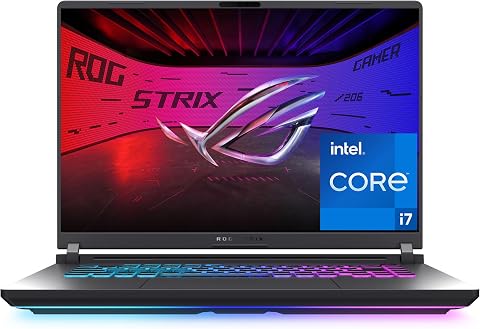 ASUS ROG Strix G16 (2025) Gaming Laptop, 16-inch FHD+ 165Hz, Intel Core i7-14…View on Amazon →
- 5
 GIGABYTE AERO X16 16-Inch Laptop with AMD Ryzen AI 7 350 and GeForce RTX 5070View on Amazon →
- 6
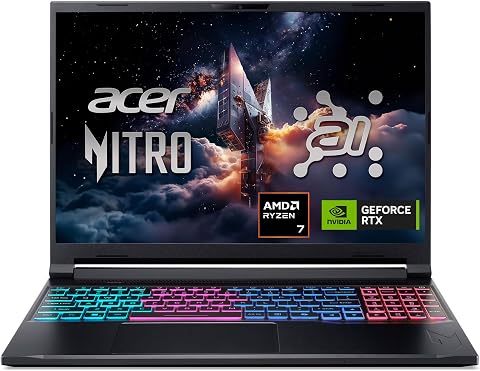 Acer Nitro V 16S AI Gaming Laptop, Ryzen 7 260, RTX 5060, 16-inch WUXGA 180Hz…View on Amazon →
- 7
 MSI Cyborg 17 17.3-inch FHD 144Hz Gaming Laptop, Intel Core 7-240H, NVIDIA Ge…View on Amazon →
- 8
 Alienware 16 Aurora Gaming Laptop, RTX 5050, Intel Core 7 240HView on Amazon →
- 9
 HP Victus 15.6" Full HD 144Hz Gaming Laptop, Intel Core i5-12450H, NVIDIA GeF…View on Amazon →
- 10
 KAIGERR LX16PRO 16-inch Gaming Laptop with AMD Ryzen 7, 16GB RAM, 512GB SSD,…View on Amazon →
Match the Laptop to Your Games
The comparison is useful because model names alone can obscure substantial differences between configurations. The two Strix G16 listings, for example, differ in stated memory and processor, so buyers need to check the exact configuration rather than assume every laptop under one model name has the same hardware. The same applies to listings with unclear graphics specifications.
Screen resolution and graphics capability also need to be considered together. A QHD+ panel can show more detail, but it asks more of the GPU than WUXGA; a high refresh rate is useful only when the laptop can deliver enough frames in the games being played. These are practical selection points, but the guide’s recommendations do not establish real-world frame rates, temperatures, battery life or noise.
Products Worth Considering

Bose QuietComfort Headphones (2nd Gen), Wireless Over-Ear Noise-Cancelling Headphones, Black

Bose Smart Dolby Atmos Soundbar, All-in-One Soundbar for TV, A.I. Dialogue Mode, Voice Control and Amazon Alexa Built-in, Supports Bluetooth

Amazon Kindle Paperwhite (2024, 16 GB) – 7-inch Display, Black
As an affiliate, we earn on qualifying purchases.
How the Guide Compares Configurations
The source says it compared the listed hardware and considered how it fits common gaming needs, favoring a balance of graphics, display and out-of-box memory and storage. It treats missing or unclear details as a drawback rather than filling them in. Its advice is to check benchmarks for the exact laptop configuration and game, since cooling and graphics power limits can affect performance even when two laptops list the same GPU.
The guide also frames memory and storage as part of the purchase decision: it describes 16GB as suitable for many players, 32GB as offering more headroom for heavier games and multitasking, and 64GB as generous but not automatically beneficial to gaming performance. It recommends checking upgradeability and warranty conditions before relying on later upgrades.
“The Ryzen 9 ROG Strix G16 leads on listed memory: its 64GB RAM and RTX 5060 make it the most generously provisioned all-rounder here, though the display is WUXGA rather than QHD+.”
— ThorstenMeyerAI.com, in its buying guide
What the Listings Leave Unanswered
The supplied source material does not include independent benchmark results, prices, retailer links, availability by region, or test data for battery life, cooling, fan noise and sustained performance. It also does not spell out the full specifications of every one of the 10 configurations. The KAIGERR listing omits a discrete GPU, and the Delca-customized Predator Helios Neo 18 listing provides little configuration information, so their gaming capabilities cannot be judged on the same basis as fully specified models.
It is also unclear from the material whether the listed configurations will remain available unchanged through 2027. Buyers should verify current component details, panel specifications, upgrade options and warranty terms with the seller. The guide’s GPU comparisons are general buying advice, not measured results for these particular machines.
Verify Specs Before Buying
The next step for shoppers is to compare current listings for the exact configuration, then consult independent reviews and game-specific benchmarks. Confirm the GPU’s laptop power rating where available, display resolution and refresh rate, RAM and SSD capacity, and whether components can be upgraded. For models with missing or sparse information, ask the seller for a complete specification sheet before purchase.
Prices, stock and configurations can change, so the source’s ranking is best treated as a starting point rather than a fixed buying verdict. No product test or follow-up benchmark is reported in the supplied material.
Key Questions
Which laptop does the guide recommend overall?
The guide names the ASUS ROG Strix G16 with Ryzen 9 9955HX, citing its listed RTX 5060, 64GB RAM and 1TB SSD. Its WUXGA screen is a tradeoff compared with the QHD+ MSI Katana.
Which pick is aimed at sharper, demanding gameplay?
The source favors the MSI Katana 15 HX listing with RTX 5070 and QHD+ for graphics-heavy play and visual detail. It does not provide independent benchmark results for that configuration.
Why compare the screen and GPU together?
Higher resolutions such as QHD+ require more graphics work than WUXGA. A high refresh rate can make motion smoother, but its benefit depends on whether the laptop can render enough frames in the games you play.
Which listings need extra checking?
The guide flags the HP Victus for its listed RTX 3050, the KAIGERR LX16PRO because the listing does not name a discrete GPU, and the Delca-customized Predator Helios Neo 18 for sparse configuration details.
Does the guide prove which laptop performs best?
No. It compares stated specifications and gives buying recommendations, but the supplied material does not include standardized testing or game-specific benchmarks. Check independent reviews of the exact configuration before buying.
Source: ThorstenMeyerAI.com