

For a premium voice assistant soundbar that combines immersive TV audio with built-in Alexa and Google Assistant, my best overall pick is the Bose Smart Ultra Dolby Atmos Soundbar, thanks to its broad voice-control support and all-in-one design. The Sonos Arc Ultra stands out for buyers prioritizing immersive Dolby Atmos and multiroom listening, while the Samsung S60D is a practical fit for Samsung TV owners who want built-in Alexa and room-adjusting sound features. The main tradeoffs are built-in versus speaker-enabled voice control, all-in-one simplicity versus a separate subwoofer, and premium sound features versus room and TV compatibility. Keep reading for the full breakdown of all 12 options and help matching one to your setup.

Get business pricing on tech for your team
- Business-only prices and quantity discounts
- Tax-exempt purchasing
- Multiple users, one account, clear invoices
Complete the kit

Key Takeaways
- Bose Smart Ultra ranks first for buyers who want built-in Alexa and Google voice control in one Dolby Atmos soundbar; the Sonos Arc Ultra is a stronger fit when multiroom audio is a priority.
- Built-in assistant support is not the same as compatibility with voice assistant-enabled speakers: the JBL Bar 500MK2 works with those speakers, while several Bose and Samsung options list assistant control directly.
- The JBL Bar 500MK2 and Fire TV Soundbar Plus include subwoofers, making them different choices from compact all-in-one designs when fuller low-end is a priority.
- The Bose Smart Soundbar 300 and Sonos Beam Gen 2 offer smaller-footprint alternatives, but buyers seeking the broadest cinematic presentation may prefer the larger premium models.
- A premium label does not guarantee the right fit: check your TV connections, assistant ecosystem, room size, and appetite for extra speakers before ranking sound features.
| Bose Smart Soundbar 300, Bluetooth Wireless Sound Bar for TV with Built-in Microphone and Alexa Voice Control, Black |  | Best for Voice-Controlled Simplicity | Drivers: 5 full-range drivers | Voice assistants: Amazon Alexa and Google Assistant | Voice control feature: Bose Voice for Video | VIEW ON AMAZON | See Our Full Breakdown |
| Bose Smart Soundbar 700 – Premium Bluetooth Soundbar with Alexa Voice Control, Black |  | Best Premium Bose Voice-Controlled Pick | Audio output mode: Stereo | Microphones: 8 | Voice assistants: Amazon Alexa and Google Assistant | VIEW ON AMAZON | See Our Full Breakdown |
| Bose Smart Dolby Atmos Soundbar, All-in-One TV Soundbar with Voice Control and Built-in Alexa, Black |  | Best Compact Atmos Option | Audio format: Dolby Atmos | Sound technology: Bose TrueSpace | Dialogue feature: AI Dialogue Mode | VIEW ON AMAZON | See Our Full Breakdown |
| Sonos Arc Ultra Soundbar with Dolby Atmos – Black |  | Best for Immersive Premium Sound | Audio channels: 9.1.4 | Audio format: Dolby Atmos | Sound technology: Sound Motion | VIEW ON AMAZON | See Our Full Breakdown |
| Sonos Beam Ultra Soundbar with Dolby Atmos and Multiroom Audio – Black |  | Best Compact Sonos System Starter | Audio channels: 7.1.2 | Drivers: 9, including dedicated up-firing drivers | Audio format: Dolby Atmos | VIEW ON AMAZON | See Our Full Breakdown |
| JBL Bar 500MK2 5.1-Channel Soundbar System |  | Best for Big, Bass-Forward Movie Sound | Channel configuration: 5.1 | Maximum system output: 750 watts | Subwoofer: 10-inch wireless | VIEW ON AMAZON | See Our Full Breakdown |
| Sonos Beam Gen 2 |  | Best Compact Smart-Home Fit | Audio channels: 2 | Audio format: Dolby Atmos | Power output: 200 watts | VIEW ON AMAZON | See Our Full Breakdown |
| Fire TV Soundbar Plus |  | Best All-in-One Dialogue Upgrade | Dimensions: 37 × 5.2 × 2.5 inches | Weight: 8.8 pounds | Channels: 3.1 with built-in subwoofer | VIEW ON AMAZON | See Our Full Breakdown |
| Bose SoundTouch 300 Soundbar | 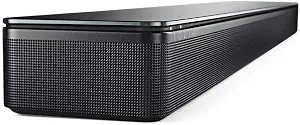 | Best Expandable Legacy System | Audio formats: Dolby Digital, DTS | Voice control: Works with Alexa through a separate Alexa-enabled device | Room calibration: ADAPTiQ | VIEW ON AMAZON | See Our Full Breakdown |
| Bose Smart Ultra Dolby Atmos Soundbar |  | Best Premium Built-In Voice Control | Audio format: Dolby Atmos | Voice assistants: Built-in Alexa and Google voice control | Sound processing: TrueSpace | VIEW ON AMAZON | See Our Full Breakdown |
| JBL Bar 300MK2 5.0 Channel All-in-One Soundbar with Dolby Atmos, MultiBeam 3.0 & PureVoice 2.0 (Black) |  | Best for Wide, Dialogue-Clear Sound | Audio channels: 5.0 | Maximum output power: 450 watts | Audio format: Dolby Atmos | VIEW ON AMAZON | See Our Full Breakdown |
| Samsung S60D 5.0-Channel Soundbar with Wireless Dolby Atmos, All-in-One Design, Q-Symphony, SpaceFit Sound Pro, Adaptive Sound, Game Mode Pro, Alexa Built-in (HW-S60D/ZA) |  | Best Compact All-in-One | Audio channels: 5.0 | Dimensions: 4.1 × 26.3 × 2.4 inches | Weight: 6 pounds | VIEW ON AMAZON | See Our Full Breakdown |
| voice assistant soundbar premium | Dimensions | Audio format |
|---|---|---|
| Bose Smart Soundbar 300 | 2.21 x 26.58 x 4.02 inches | — |
| Bose Smart Soundbar 700 | 4.25 x 38.5 x 2.25 inches | — |
| Bose Smart Dolby Atmos Soundba | 4.09 x 27.34 x 2.21 inches | Dolby Atmos |
| Sonos Arc Ultra Soundbar with | 46.18 inches wide | Dolby Atmos |
| Sonos Beam Ultra Soundbar with | — | Dolby Atmos |
| JBL Bar 500MK2 5.1-Channel Sou | — | — |
| Sonos Beam Gen 2 | — | Dolby Atmos |
| Fire TV Soundbar Plus | 37 × 5.2 × 2.5 inches | — |
| Bose SoundTouch 300 Soundbar | — | — |
| Bose Smart Ultra Dolby Atmos S | — | Dolby Atmos |
| JBL Bar 300MK2 5.0 Channel All | — | Dolby Atmos |
| Samsung S60D 5.0-Channel Sound | 4.1 × 26.3 × 2.4 inches | — |
More Details on Our Top Picks
Bose Smart Soundbar 300, Bluetooth Wireless Sound Bar for TV with Built-in Microphone and Alexa Voice Control, Black
The Bose Smart Soundbar 300 suits buyers who want Alexa and Google Assistant built into a compact TV bar without stepping up to the larger, more theater-focused models here. Its five full-range drivers aim for clear, spacious sound, while Bose Voice for Video can link a spoken command to the bar, TV, and cable or satellite box. That makes everyday control its strongest point, rather than immersive effects: unlike the Bose Smart Dolby Atmos Soundbar or Sonos Arc Ultra, this model does not list Dolby Atmos support. It also offers flexible music playback over Wi-Fi, Bluetooth, AirPlay 2, and Spotify Connect. The tradeoff is expansion and setup: HDMI is sold separately, and fuller bass or surround sound requires optional Bose speakers or a bass module. I’d choose it for voice-first convenience, not a cinematic upgrade.
Pros:- Built-in Alexa and Google Assistant with a microphone system designed to hear voices from multiple directions
- Voice for Video can control the soundbar, TV, and cable or satellite box with one command
- Streams over Wi-Fi, Bluetooth, Apple AirPlay 2, and Spotify Connect
- Low-profile 2.21-inch height and several options for adding Bose bass or surround speakers
Cons:- No Dolby Atmos support, unlike the Bose Smart Dolby Atmos Soundbar and Sonos Arc Ultra
- HDMI cable is sold separately; an optical cable is included
- A separate Bose bass module or surround speakers are needed to build a fuller system
Best for: TV owners who want hands-free Alexa or Google Assistant control, straightforward music streaming, and a slim bar that fits below most screens.
Not ideal for: Movie fans seeking Dolby Atmos height effects or strong bass straight from the box; HDMI cable buyers should also note that one is not included.
- Drivers:5 full-range drivers
- Voice assistants:Amazon Alexa and Google Assistant
- Voice control feature:Bose Voice for Video
- Streaming:Bluetooth, Wi-Fi, Apple AirPlay 2, Spotify Connect
- TV connection:Optical cable included; HDMI cable sold separately
- Dimensions:2.21 x 26.58 x 4.02 inches
- Expansion:Compatible with Bose Bass Module 500 or 700 and Bose Surround Speakers 700
Our verdict“Choose the Soundbar 300 if built-in voice control and a compact footprint matter more than Atmos effects or deep standalone bass.”
Bose Smart Soundbar 700 – Premium Bluetooth Soundbar with Alexa Voice Control, Black
The Bose Smart Soundbar 700 is the Bose choice for buyers who want a more substantial design and built-in voice control in a wider bar. Its eight-microphone array gives it a stronger voice-control specification than the single-microphone Bose Smart Dolby Atmos Soundbar listed here, while Alexa and Google Assistant cover both smart-home commands and hands-free requests. Wi-Fi, Bluetooth, and AirPlay 2 also give it broad music-streaming options. The 700 is not the pick for the newest surround formats, though: unlike the Sonos Arc Ultra, the supplied details do not list Dolby Atmos or multichannel Atmos output. Its 38.5-inch width also asks for more TV-stand space than the compact Bose Soundbar 300. I’d rank it for buyers who favor Bose design, assistant access, and room calibration over Atmos height effects or a small footprint.
Pros:- Eight built-in microphones support hands-free Alexa and Google Assistant access
- Wi-Fi, Bluetooth, and Apple AirPlay 2 provide multiple music-streaming routes
- Room calibration is listed to adapt sound to the room
- Glass and metal construction gives it a more substantial design than the smaller Bose Soundbar 300
Cons:- Dolby Atmos support is not listed, unlike the Sonos Arc Ultra and Bose Smart Dolby Atmos Soundbar
- At 38.5 inches wide, it needs more shelf space than the Bose Soundbar 300
- Corded power and no water resistance limit placement to indoor use near an outlet
Best for: Bose-focused buyers with room for a wider soundbar who want Alexa and Google Assistant, multi-platform streaming, and room calibration.
Not ideal for: People seeking Dolby Atmos playback, a compact bar, or a battery-powered or outdoor speaker; this is a corded indoor soundbar.
- Audio output mode:Stereo
- Microphones:8
- Voice assistants:Amazon Alexa and Google Assistant
- Connectivity:Wi-Fi, Bluetooth, Apple AirPlay 2
- Dimensions:4.25 x 38.5 x 2.25 inches
- Weight:10.5 pounds
- Enclosure materials:Glass, metal, and plastic
- Power:Corded electric
Our verdict“Pick the Bose Smart Soundbar 700 for a wider, voice-led Bose setup with room calibration, but choose the Arc Ultra if Atmos is a priority.”
Bose Smart Dolby Atmos Soundbar, All-in-One TV Soundbar with Voice Control and Built-in Alexa, Black
This Bose model is the compact Atmos pick for buyers who want Dolby Atmos and built-in Alexa and Google Assistant in a bar just over 27 inches wide. Bose TrueSpace is intended to create a more enveloping presentation, while AI Dialogue Mode targets clearer speech when voices compete with effects. Compared with the Bose Smart Soundbar 300, it adds Atmos support and dialogue processing; compared with the much wider Sonos Arc Ultra, it asks for less shelf space. The tradeoff is that its listed single microphone gives less reassurance for voice pickup in noisy rooms than the eight-microphone Soundbar 700. It is an all-in-one bar, so buyers wanting more substantial bass or separate rear channels may still need to expand or choose another system. I’d favor it when a small footprint and Atmos matter more than microphone redundancy.
Pros:- Dolby Atmos and TrueSpace add an immersive-sound focus absent from the Bose Smart Soundbar 300
- AI Dialogue Mode is designed to make speech easier to follow
- Alexa and Google Assistant are built in, with voice, remote, and app control
- At 27.34 inches wide, it is much more compact than the Sonos Arc Ultra
Cons:- One listed microphone may be less suited to voice pickup in noisy rooms than the Soundbar 700’s eight-microphone array
- A compact all-in-one bar may not satisfy buyers seeking stronger bass or separate rear speakers
- App-based setup may add steps for buyers who prefer controls without a companion app
Best for: Apartment dwellers and owners of smaller TVs who want a compact Bose bar with Dolby Atmos, voice assistants, and dialogue enhancement.
Not ideal for: Buyers with noisy rooms who prioritize robust hands-free pickup, or those seeking a large-scale surround system and powerful standalone bass.
- Audio format:Dolby Atmos
- Sound technology:Bose TrueSpace
- Dialogue feature:AI Dialogue Mode
- Voice assistants:Amazon Alexa and Google Assistant
- Microphones:1
- Control methods:Voice, remote, and app
- Dimensions:4.09 x 27.34 x 2.21 inches
- Bluetooth range:30 feet
Our verdict“Choose this Bose if you want Atmos and voice assistants in a compact bar, and can accept less microphone coverage than the Soundbar 700.”
Sonos Arc Ultra Soundbar with Dolby Atmos – Black
The Sonos Arc Ultra ranks first for buyers who want the most ambitious listed surround format in this group: 9.1.4-channel Dolby Atmos with Sound Motion technology. Its wide, 46.18-inch body is built for a larger screen and a room where expansive playback matters more than a discreet bar. Compared with the compact Bose Smart Dolby Atmos Soundbar, the Arc Ultra claims a much broader channel layout, but it also needs substantially more space. Wi-Fi, Bluetooth, HDMI, and app or voice control support flexible use, while multiroom audio extends its appeal beyond the TV. Voice-assistant details are less specific here than on the Bose models, which name Alexa and Google Assistant directly. The tradeoff is a large footprint and dependence on compatible equipment for full functionality; I’d choose it for immersive playback first, not for compactness or clearly specified assistant choice.
Pros:- Listed 9.1.4-channel Dolby Atmos output targets a broader sense of height and surround than the Bose compact Atmos bar
- Sound Motion technology is designed for immersive playback
- Wi-Fi, Bluetooth, and HDMI support several connection types
- Built-in microphone and multiroom audio support voice control and listening beyond the TV
Cons:- Its 46.18-inch width requires more space than the Bose Smart Dolby Atmos Soundbar
- Full functionality depends on compatible devices
- The product details do not name a specific voice assistant, unlike the Bose models
Best for: Owners of large TVs and compatible home theater equipment who want a wide, immersive Dolby Atmos soundstage and multiroom audio.
Not ideal for: Small-room shoppers, buyers with narrow TV stands, or anyone who needs a specifically named built-in assistant before choosing.
- Audio channels:9.1.4
- Audio format:Dolby Atmos
- Sound technology:Sound Motion
- Connectivity:Bluetooth, HDMI, Wi-Fi
- Controls:App and voice
- Microphone:Built-in
- Dimensions:46.18 inches wide
- Enclosure material:Metal
Our verdict“Choose the Arc Ultra for a large-room, Atmos-focused Sonos system, but check space and assistant compatibility before buying.”
Sonos Beam Ultra Soundbar with Dolby Atmos and Multiroom Audio – Black
The Sonos Beam Ultra is the smaller Sonos alternative for buyers who want Dolby Atmos in a 7.1.2-channel format without the Arc Ultra’s 46.18-inch span. Nine drivers, including dedicated up-firing channels, support a more height-focused presentation than the Bose Smart Soundbar 300, while AI Speech Enhancement targets intelligible dialogue. Trueplay room tuning is another useful distinction: the bar can adjust its sound for the room rather than asking the buyer to make every change manually. It also supports voice, app, and remote control, plus expansion with other Sonos components. The compromise is bass: the supplied description says it is limited without an additional subwoofer. Its listed dimensions also appear unusual, so I would confirm fit with the seller before purchase. Compared with the Arc Ultra, this is the more space-conscious Sonos route, but not the most expansive one.
Pros:- 7.1.2-channel Dolby Atmos design includes dedicated up-firing drivers
- AI Speech Enhancement is aimed at clearer dialogue
- Trueplay room tuning adjusts playback for the listening space
- Voice, app, and remote controls pair with the option to expand using Sonos components
Cons:- Bass is limited without an additional subwoofer
- The listed dimensions are unusual and should be checked before planning placement
- Its channel layout is less expansive than the Sonos Arc Ultra’s listed 9.1.4 configuration
Best for: Sonos-curious buyers with modest TV-stand space who want Atmos, speech enhancement, and a system they can expand later.
Not ideal for: Listeners who want substantial bass without adding a subwoofer, or shoppers who need clearly verified dimensions before checking their available space.
- Audio channels:7.1.2
- Drivers:9, including dedicated up-firing drivers
- Audio format:Dolby Atmos
- Dialogue feature:AI Speech Enhancement
- Room tuning:Trueplay
- Control methods:App, remote, and voice
- Connectivity:Bluetooth, HDMI, Wi-Fi
- Weight:6.4 pounds
Our verdict“Choose the Beam Ultra for a more compact, expandable Sonos Atmos setup, provided you are willing to add a subwoofer for fuller bass.”
JBL Bar 500MK2 5.1-Channel Soundbar System
The JBL Bar 500MK2 is my pick for buyers who want a voice-assistant-compatible system that puts movie impact ahead of built-in voice control. Its 10-inch wireless subwoofer and 750 watts of stated maximum system output give action scenes and music a scale the compact Sonos Beam Gen 2 cannot match. Dolby Atmos, MultiBeam 3.0, and room calibration add a wider, more tailored presentation, while PureVoice 2.0 works to keep dialogue audible when scenes get loud.
The voice-assistant caveat matters: unlike the Bose Smart Ultra, this JBL does not list Alexa or Google as built-in controls; it works with compatible assistant-enabled speakers. That makes it a stronger fit for buyers who already use a smart speaker than for anyone seeking a standalone voice hub. The separate subwoofer also needs space, and virtualized surround effects are not the same as rear speakers.
Pros:- 10-inch wireless subwoofer supplies substantial low-frequency impact for films and games.
- Dolby Atmos and MultiBeam 3.0 create a broad, cinema-style sound field without rear speakers.
- PureVoice 2.0 is designed to keep dialogue clearer against loud effects.
- HDMI eARC, 4K Dolby Vision passthrough, and broad streaming support suit varied home entertainment setups.
Cons:- Voice control depends on a separate compatible assistant-enabled speaker rather than built-in Alexa or Google Assistant.
- The subwoofer requires additional floor space and may be excessive for small rooms or bass-sensitive households.
- Virtual surround effects cannot provide the same placement cues as dedicated rear speakers.
Best for: Movie and gaming households with room for a separate subwoofer and an existing Google Assistant- or Siri-enabled speaker for hands-free music control.
Not ideal for: Buyers who want Alexa or Google voice control built into the soundbar, or a compact all-in-one system without a subwoofer to place.
- Channel configuration:5.1
- Maximum system output:750 watts
- Subwoofer:10-inch wireless
- Audio formats:Dolby Atmos
- Dialogue feature:PureVoice 2.0
- Room calibration:Easy sound calibration
- Connections:HDMI eARC, HDMI input, optical, USB, Bluetooth, Wi-Fi
- Voice assistant support:Works with compatible Google Assistant- or Siri-enabled speakers
Our verdict“Choose the JBL if cinematic bass and wide virtual surround matter more than having voice control built into the soundbar.”
Sonos Beam Gen 2
The Sonos Beam Gen 2 suits buyers who want a compact soundbar that can anchor music and TV listening without adding a separate subwoofer. Its Dolby Atmos support and app, remote, voice, and AirPlay 2 controls give it a broader everyday role than a TV-only bar. Compared with the JBL Bar 500MK2, the Beam takes up less room and better fits a Sonos multiroom setup, but it gives up the JBL’s dedicated 10-inch subwoofer and higher stated system output.
The voice-control description is less specific than Bose’s Smart Ultra, which explicitly lists built-in Alexa and Google control. Buyers should check which voice services are supported in their setup rather than assume every assistant works natively. The Beam is also a 2-channel bar, so Atmos effects are processed from a compact front-stage system, not delivered by a full array of surround speakers. Its appeal is simplicity and expandability, not room-shaking bass.
Pros:- Compact shelf-mounted design fits more easily than the JBL Bar 500MK2 system with its separate subwoofer.
- Dolby Atmos support adds height-oriented effects to a small soundbar.
- App, remote, voice, and AirPlay 2 controls support varied listening habits.
- Can be expanded into a larger Sonos home audio setup.
Cons:- Two-channel configuration and compact format limit physical surround separation and deep bass.
- The provided product details do not identify specific built-in voice assistants.
- Best performance depends on a corded setup and compatible TV connection.
Best for: Apartment dwellers and Sonos households seeking a compact TV bar that also handles music, podcasts, and multiroom listening.
Not ideal for: Buyers prioritizing powerful standalone bass, clearly specified built-in assistant support, or a wide physical surround-speaker layout.
- Audio channels:2
- Audio format:Dolby Atmos
- Power output:200 watts
- Frequency response:50.4 Hz
- Controls:App, remote, and voice
- Connections:HDMI, Wi-Fi, Ethernet
- Wireless features:AirPlay, NFC, Wi-Fi
- Mounting:Shelf mount
Our verdict“Pick the Beam Gen 2 if compact size and Sonos-friendly music playback outweigh the JBL’s stronger bass or Bose’s explicit built-in assistant controls.”
Fire TV Soundbar Plus
The Fire TV Soundbar Plus is a practical choice for buyers who want a single bar that improves dialogue and adds bass without placing a separate subwoofer. Its 3.1-channel layout and built-in subwoofer give voices a dedicated center channel while keeping installation simpler than the JBL Bar 500MK2, which uses an external wireless sub. Dolby Atmos and DTS:X support broaden compatibility with spatial-audio content, and movie, music, sports, and night modes make quick listening adjustments straightforward.
For a roundup centered on voice assistants, though, this model is more about clear spoken TV audio than hands-free assistant control: the supplied details do not list a built-in assistant or voice microphone. The Bose Smart Ultra is the clearer choice for Alexa or Google control. The Fire TV’s integrated bass saves space, but it cannot be repositioned like JBL’s subwoofer, and its 3.1-channel design is not a substitute for rear speakers.
Pros:- Built-in subwoofer adds bass without a separate floor-standing unit.
- Dedicated 3.1-channel layout is suited to making dialogue stand out.
- Supports both Dolby Atmos and DTS:X formats.
- Four sound modes offer simple adjustments for films, music, sports, and nighttime viewing.
Cons:- Product details do not specify built-in voice-assistant control.
- Integrated bass cannot be moved away from the bar or upgraded as a separate subwoofer.
- Three front channels do not provide the separation of a system with rear speakers.
Best for: TV viewers who want clearer dialogue and stronger bass from one easy-to-install bar, especially in rooms without space for a separate subwoofer.
Not ideal for: Buyers seeking built-in Alexa or Google voice control, a dedicated wireless subwoofer, or physical rear-channel surround sound.
- Dimensions:37 × 5.2 × 2.5 inches
- Weight:8.8 pounds
- Channels:3.1 with built-in subwoofer
- Supported formats:Dolby Atmos, DTS:X
- Sound modes:Movie, Music, Sports, Night
- Connections:HDMI, optical, USB-A
- Wireless audio:Bluetooth
- Warranty:1-year limited
Our verdict“Choose the Fire TV Soundbar Plus for a straightforward dialogue-and-bass upgrade, but pick the Bose Smart Ultra if built-in assistant control is the priority.”
Bose SoundTouch 300 Soundbar
The Bose SoundTouch 300 is aimed at buyers who want a polished standalone bar now and the option to build a larger system later. ADAPTiQ room calibration tailors playback to the listening space, while QuietPort is designed to deliver bass from the bar with reduced distortion. Unlike the JBL Bar 500MK2, this package does not include a subwoofer; unlike the Bose Smart Ultra, it also lacks Dolby Atmos and requires a separate Alexa-enabled device for voice control.
Its strongest argument is modularity: optional Bose bass and surround components can turn it into a fuller home theater setup, and Wi-Fi, Bluetooth, and NFC cover several ways to stream. That flexibility comes with a real commitment to the older SoundTouch ecosystem and extra components for deeper bass or rear effects. I would choose it only when expandability and its calibration approach matter more than built-in assistant convenience or current Atmos support.
Pros:- ADAPTiQ calibration adjusts playback to room acoustics.
- QuietPort design aims for bass from the bar while limiting distortion.
- Wi-Fi, Bluetooth, and NFC provide multiple streaming and pairing options.
- Can expand with optional Bose bass and surround components.
Cons:- No subwoofer is included, so deep bass requires an additional component.
- Alexa voice control requires a separate Alexa-enabled device.
- Does not list Dolby Atmos support, unlike newer premium options such as the Bose Smart Ultra.
Best for: Bose owners who want a calibrated soundbar and plan to add compatible bass or surround components over time.
Not ideal for: Buyers who want Dolby Atmos, included deep-bass hardware, or voice control without a separate Alexa-enabled device.
- Audio formats:Dolby Digital, DTS
- Voice control:Works with Alexa through a separate Alexa-enabled device
- Room calibration:ADAPTiQ
- Connections:HDMI with 4K passthrough, Bluetooth, Wi-Fi, NFC
- Streaming services:Amazon Music, Spotify, Pandora
- Expansion:Optional bass module and surround speakers
- Mounting:Tabletop or optional wall bracket
- Included subwoofer:None
Our verdict“Consider the SoundTouch 300 if you value Bose system expandability and room calibration more than built-in voice control or Atmos.”
Bose Smart Ultra Dolby Atmos Soundbar
The Bose Smart Ultra earns the premium voice-assistant role because Alexa and Google voice control are built in, rather than delegated to a separate smart speaker as with the JBL Bar 500MK2 or Bose SoundTouch 300. Its Dolby Atmos processing, TrueSpace technology, and six transducers—including upward-firing drivers—aim to create a more enveloping presentation from one tabletop bar. A.I. Dialogue Mode also targets a common frustration: keeping speech intelligible without constantly changing volume.
The all-in-one layout is neater than JBL’s bar-and-subwoofer package, but it gives up the JBL’s dedicated 10-inch bass unit. The supplied specifications also omit channel count and power output, so buyers have less hard data for judging scale. This is a strong match for a refined TV setup where assistant access and dialogue clarity lead; listeners who want substantial low-end impact or separate surround speakers may prefer a system they can expand.
Pros:- Built-in Alexa and Google voice control provide direct hands-free access.
- Six transducers, including upward-firing speakers, support an Atmos-oriented presentation.
- TrueSpace processing is designed to create a more spacious sound field.
- A.I. Dialogue Mode prioritizes vocal clarity.
Cons:- No dedicated subwoofer is listed, unlike the JBL Bar 500MK2 package.
- The provided specifications do not state channel count or power output.
- A single-bar design does not provide the placement of separate rear surround speakers.
Best for: Premium TV buyers who want Alexa and Google voice control directly in the soundbar, plus Atmos effects and dialogue-focused processing.
Not ideal for: Bass-first movie fans who want a dedicated subwoofer in the box, or buyers seeking a clearly specified multi-channel system with separate rear speakers.
- Audio format:Dolby Atmos
- Voice assistants:Built-in Alexa and Google voice control
- Sound processing:TrueSpace
- Dialogue feature:A.I. Dialogue Mode
- Transducers:Six, including upward-firing speakers
- Connections:HDMI eARC, Bluetooth, Wi-Fi
- Controls:App, remote, voice
- Mounting:Tabletop
Our verdict“Choose the Bose Smart Ultra when built-in Alexa or Google control and clearer dialogue matter more than a dedicated subwoofer or modular surround setup.”
JBL Bar 300MK2 5.0 Channel All-in-One Soundbar with Dolby Atmos, MultiBeam 3.0 & PureVoice 2.0 (Black)
The JBL Bar 300MK2 suits viewers who want a broad, surround-style presentation without adding a separate subwoofer. Its Dolby Atmos and MultiBeam 3.0 processing aim to spread sound beyond the 37-inch bar, while PureVoice 2.0 helps spoken lines stay clear when effects and music get busy. Compared with the Samsung S60D, JBL offers a wider stated maximum output and room calibration, while Samsung has a built-in subwoofer in its compact all-in-one body. That makes the Samsung a better fit for buyers prioritizing bass in a smaller footprint; JBL is the stronger match for dialogue clarity and placement flexibility. The tradeoff is that the JBL has no built-in subwoofer, so bass-heavy films may call for additional support. Built-in microphones and voice-assistant connectivity add convenience, though this is not a substitute for a dedicated smart speaker in every setup.
Pros:- Dolby Atmos and MultiBeam 3.0 create a broad, surround-style sound presentation.
- PureVoice 2.0 emphasizes dialogue for clearer speech during busy scenes.
- JBL ONE app and room calibration simplify setup and tuning.
- HDMI eARC, Wi-Fi, Bluetooth, optical, and USB offer flexible connections.
Cons:- No built-in subwoofer, so deep movie bass may need separate support.
- At 37 inches, it may be too large for narrow TV stands or small screens.
- Voice-assistant features depend on the connected service and setup.
Best for: TV viewers who want clear dialogue, virtual surround effects, voice-assistant access, and room calibration in one bar without adding rear speakers.
Not ideal for: Buyers seeking strong built-in bass or a very compact bar; the Samsung S60D has an integrated subwoofer and a shorter, narrower body.
- Audio channels:5.0
- Maximum output power:450 watts
- Audio format:Dolby Atmos
- Sound processing:MultiBeam 3.0 and PureVoice 2.0
- Speaker size:37 inches
- Connectivity:HDMI, optical, USB, Wi-Fi, Bluetooth
- Wireless technologies:AirPlay and Bluetooth
- Controls:App, remote, and voice
Our verdict“Choose the JBL Bar 300MK2 if wide virtual surround and clearer dialogue matter more to you than built-in deep bass or a compact footprint.”
Samsung S60D 5.0-Channel Soundbar with Wireless Dolby Atmos, All-in-One Design, Q-Symphony, SpaceFit Sound Pro, Adaptive Sound, Game Mode Pro, Alexa Built-in (HW-S60D/ZA)
The Samsung S60D is the more space-conscious choice here: its 26.3-inch-wide body combines five channels with a built-in subwoofer, avoiding the separate bass module required for a fuller low end from the JBL Bar 300MK2. Alexa built in gives it a direct voice-control advantage for buyers who want a smart assistant at the TV, while SpaceFit Sound Pro and Adaptive Sound adjust playback to the room and content. Samsung also has a distinctive advantage for owners of compatible Samsung televisions: Q-Symphony can coordinate the bar with the TV speakers. That feature makes less difference with other brands, and the fullest integration is limited to compatible Samsung TVs. Compared with the JBL, this is easier to fit and has built-in bass, but its feature set leans more heavily on the Samsung ecosystem. Its mixed plastic, aluminum, and wood/MDF construction may also feel less upscale than buyers expect from a premium soundbar.
Pros:- Compact 26.3-inch width fits more easily on crowded TV stands.
- Built-in subwoofer adds bass without a separate wireless module.
- Alexa is integrated, with Chromecast and AirPlay 2 listed among its smart features.
- SpaceFit Sound Pro and Adaptive Sound tailor playback to the room and content.
Cons:- Q-Symphony benefits depend on owning a compatible Samsung TV.
- The compact all-in-one design cannot offer the placement flexibility of a separate subwoofer.
- Mixed plastic, aluminum, and wood/MDF construction may feel less premium than expected.
Best for: Apartment dwellers and Samsung TV owners who want an Alexa-enabled, compact soundbar with built-in bass and automatic room tuning.
Not ideal for: Owners of non-Samsung TVs who want the full Q-Symphony experience, or buyers seeking a more substantial cabinet and premium-feeling materials.
- Audio channels:5.0
- Dimensions:4.1 × 26.3 × 2.4 inches
- Weight:6 pounds
- Subwoofer:Built-in; listed subwoofer diameter is 8 inches
- Audio features:Wireless Dolby Atmos, Q-Symphony, SpaceFit Sound Pro, Adaptive Sound, Game Mode Pro
- Voice assistant:Alexa built in
- Connectivity and services:Wireless Dolby Atmos, Chromecast, and AirPlay 2
- Power source:Corded electric
Our verdict“Pick the Samsung S60D if you want an Alexa-ready soundbar with built-in bass in a compact body, especially when pairing it with a compatible Samsung TV.”

How We Picked
I ranked these soundbars around the needs behind the search: strong TV sound paired with voice control that fits a real home setup. I weighed the listed audio capabilities, including Dolby Atmos, channel configuration, subwoofer inclusion, and dialogue features, alongside assistant support, TV connectivity, room-calibration tools, and multiroom options. I also treated product naming carefully: a soundbar that works with voice assistant-enabled speakers is not automatically the same as one with a built-in microphone and assistant.
The order favors a useful balance of premium sound, straightforward control, and flexibility rather than the longest feature list. That puts the Bose Smart Ultra first for its listed Alexa and Google control, with Sonos Arc Ultra close behind for Atmos and multiroom appeal. Models with clearer specialist strengths—such as the JBL Bar 500MK2’s included subwoofer or the Samsung S60D’s Samsung-focused features—rank well for the right buyer, but their advantages depend more on room, TV, and ecosystem fit. Older or more limited options sit lower when newer choices in this lineup offer a more direct route to premium sound and voice control.
Factors to Consider When Choosing Voice Assistant Soundbar Premium
Before choosing, separate the promise of hands-free convenience from the soundbar’s actual audio and connection setup. These broader checks can prevent paying for features that do not suit your room, TV, or preferred assistant.
Check Whether Voice Control Is Built In
Product listings use different wording for assistant support, and the distinction affects daily use. A built-in microphone and assistant can accept commands directly, while a model that works with voice assistant-enabled speakers may depend on a separate smart speaker. Decide whether you want to control music and compatible smart-home devices from the soundbar itself or simply use your existing assistant speaker to manage playback. Also check whether a microphone mute control is available if privacy matters in a living room. Do not assume Alexa support means Google Assistant support, or that either assistant offers identical functions across brands. Match the soundbar’s listed assistant setup to the devices and services you already use.
Match Dolby Atmos to Your Room and Content
Dolby Atmos branding alone does not tell you how convincing height effects will be in your room. Room shape, ceiling height, furniture placement, and the source material all affect what you hear, so an all-in-one bar cannot promise the same experience in every home. Check whether your usual films and streaming services provide Atmos tracks, and confirm that your TV connection can pass the audio format you want. If you mostly watch dialogue-driven programs, clear speech and balanced sound may matter more than chasing the most immersive format. Avoid buying around a format name without checking the full signal path from streaming device to TV to soundbar. A capable soundbar is only one part of that chain.
Decide Between All-in-One Simplicity and a Separate Subwoofer
An all-in-one soundbar keeps the setup compact and avoids placing another speaker in the room. A model with a separate subwoofer can provide more dedicated low-frequency output, but it needs floor space, a power connection, and a suitable position. Consider neighbors, shared walls, and whether you can adjust bass without making dialogue harder to hear. A built-in subwoofer can simplify placement, though it is not equivalent to a separate unit in every room or listening situation. Think about where the soundbar and any subwoofer will sit before choosing by channel count alone. The best fit is the one whose physical setup you will be comfortable keeping in place.
Verify TV Connections Before You Buy
HDMI eARC and ARC determine how audio travels between a TV and soundbar, and the ports your TV has can shape which features work. Check the television manual for supported connections and audio formats rather than relying only on the soundbar’s feature list. If you use a streaming box, game console, or Blu-ray player, map which device connects where and whether the TV passes through the sound formats you need. Optical connections can be useful on older TVs, but may not carry every advanced audio format. A connection mismatch can limit features even when both products advertise them. This check matters especially when replacing an older bar while keeping an older television.
Choose Ecosystem Features You Will Actually Use
Multiroom audio, brand-specific TV pairing, room calibration, and adaptive sound can add real convenience, but only when they fit your existing devices and habits. Samsung’s Q-Symphony is most relevant to buyers pairing compatible Samsung TVs, while Sonos multiroom features appeal to households that want audio across multiple rooms. Calibration tools may help account for room acoustics, yet they do not remove the need to place the bar sensibly. List the features you will use each week and treat the rest as secondary. If you do not own compatible equipment, do not let ecosystem-specific features outweigh a better match in voice control or placement. This keeps a premium purchase focused on benefits that apply to your home.
Budget for Setup, Not Just the Soundbar
A premium soundbar can lead to extra setup needs, including a compatible TV connection, a stable network for smart features, or space for a subwoofer. Check what is included and whether rear speakers or other accessories are separate purchases before committing to a surround-sound plan. Confirm that your Wi-Fi reaches the TV area if voice services and streaming features depend on a network connection. If you rent or move often, a single-bar setup may be easier to relocate than a system with multiple components. Buyers who want a simple upgrade should prioritize easy connections and dialogue clarity over expansion plans they may never use. Paying for a system that suits your current room often makes more sense than planning around a hypothetical future setup.
Frequently Asked Questions
Should I choose a soundbar with a built-in voice assistant or one that works with a separate smart speaker?
Choose built-in voice control if you want the soundbar itself to hear commands without relying on another device. A soundbar that works with voice assistant-enabled speakers may suit you better if you already own a smart speaker and prefer to keep microphones elsewhere. Check which assistant is supported and whether the product listing specifies a built-in microphone. Also review how voice control works when the TV is off, since capabilities can vary by model and setup. For this lineup, the difference is especially relevant when comparing direct assistant support on models such as the Bose Smart Ultra with the JBL Bar 500MK2’s compatibility with assistant-enabled speakers.
Can I get a useful Dolby Atmos setup from an all-in-one soundbar?
Yes, an all-in-one soundbar can provide a simpler route to Atmos-compatible TV audio without adding several speakers. Its spatial effect depends on the soundbar design, room shape, placement, and whether the program is actually mixed in Atmos. Check that your TV and connection can pass the format, or the soundbar may not receive the signal you expect. If you want stronger bass, compare all-in-one options with models that include a separate subwoofer. Buyers who want a discreet setup may accept a less expansive presentation in exchange for fewer components.
Is an included subwoofer worth the extra space and setup?
An included subwoofer can be a good fit if you want more dedicated bass for films, games, or music and have a suitable place to put it. It also adds another device to position and connect, which can complicate a clean or compact living-room setup. Think about shared walls and whether low-frequency output will suit your household. If you mostly watch dialogue-led television, an all-in-one model may be easier to live with. Compare the JBL Bar 500MK2 and Fire TV Soundbar Plus against compact all-in-one options based on room and listening habits, not channel numbers alone.
Will a premium soundbar work with an older TV?
It may, but the available ports and audio pass-through support determine which features remain available. Check the TV manual for HDMI ARC or eARC and supported audio formats before buying. Some older televisions rely on optical audio, which can carry basic sound but may not support every advanced format or feature. You should also check whether your streaming device connects to the TV or directly to the soundbar. When the television is several years old, matching its connection limits may matter more than choosing a model with the newest audio capabilities.
Which features should I prioritize if I mainly watch dialogue-heavy shows?
Prioritize clear dialogue, convenient volume control, and reliable TV connectivity over a large list of surround formats. A dialogue-enhancement feature can help, but it cannot fix every issue caused by room acoustics, poor placement, or a low-quality source. Check whether the soundbar lets you adjust speech and bass independently so voices remain intelligible at comfortable listening levels. You may not need a separate subwoofer if your main goal is clearer television speech. For this use, a feature-focused model such as the Fire TV Soundbar Plus, with listed clear dialogue support, deserves attention alongside the broader premium options.
Conclusion
For the broadest fit among these picks, I recommend the Bose Smart Ultra as best overall, particularly for buyers who want built-in Alexa and Google voice control with Dolby Atmos. My best value choice is the Sonos Beam Gen 2 for a more compact route into Atmos and Sonos features, while the Sonos Arc Ultra is my best premium pick for buyers who prioritize immersive sound and multiroom listening. Beginners who want a straightforward all-in-one upgrade should look at the Bose Smart Soundbar 300; Samsung TV owners seeking a closer match to their existing ecosystem may prefer the Samsung S60D. For fuller bass from an included subwoofer, compare the JBL Bar 500MK2 and Fire TV Soundbar Plus, then choose based on voice-control needs and TV compatibility. My final advice is to confirm assistant support and TV connections before deciding, since those details separate a soundbar that fits your setup from one whose headline features go unused.


