A smart lock with keypad and app gives you code-based entry at the door and phone control for remote access, but the right choice depends on your door, preferred unlock method, and need for built-in Wi-Fi. My best overall pick is the Schlage Encode Smart WiFi Deadbolt for buyers prioritizing an established deadbolt design and direct Wi-Fi access; the Wyze Auto-Lock Bolt v2 stands out for fingerprint entry and auto-lock features, while the Philips WiFi Keypad Deadbolt with Handle is a useful option for shoppers who want a coordinated handle set. The main tradeoffs are deadbolt versus handle or knob formats, fingerprint convenience versus keypad simplicity, and remote control without a separate hub versus other connectivity arrangements. Read on for the full comparison, buying advice, and picks for different needs.

Get business pricing on tech for your team
- Business-only prices and quantity discounts
- Tax-exempt purchasing
- Multiple users, one account, clear invoices
Key Takeaways
- Schlage Encode is the roundup’s premium-leaning choice for buyers who want a recognizable deadbolt format with Wi-Fi access, while several Philips models offer similar keypad-and-app basics in different trim and handle configurations.
- Wyze Auto-Lock Bolt v2 separates itself with fingerprint access, an anti-peep keypad, and auto-lock functions; those extras matter most to households that value multiple entry methods.
- The Philips entries are not interchangeable: some include a handle set, some are deadbolts only, and one listed model adds fingerprint and voice-unlock features.
- The two Veise VE017 listings share a model name and fingerprint-and-app positioning but differ by finish, so shoppers should choose by door hardware style rather than expect a different feature set.
- Several less-established or broadly named options list keypad, fingerprint, or app functions but provide less specific information in their product names; verify connectivity, compatibility, and included hardware before choosing them over clearly specified models.
| Keyless Entry Door Lock with Digital Keypad and WiFi – Smart Lock for Front Door |  | Best for Backup Access | Brand / model: Zylenor / Zylenor100 | Connectivity: Wi-Fi | Control methods: App, push button, voice | VIEW ON AMAZON | See Our Full Breakdown |
| Philips WiFi Keypad Door Lock with Handle, App Control Smart Deadbolt Lock |  | Best for Straightforward Wi-Fi Access | Model: DDL242X-15HW-L | Connectivity: Built-in Wi-Fi | Access methods: Keys, passcodes, voice commands, app | VIEW ON AMAZON | See Our Full Breakdown |
| DESLOC B200 Fingerprint Smart Door Lock, Keyless Entry Deadbolt |  | Best for Fingerprint Entry | Brand / model: DESLOC / B200 | Connectivity: Bluetooth with G2 Gateway; app control | Access methods: Fingerprint, PIN, app, voice, physical keys | VIEW ON AMAZON | See Our Full Breakdown |
| Philips WiFi Keypad Deadbolt with Handle, Built-in WiFi, App Remote Control |  | Best for Fingerprint and Keypad Choice | Model: DDL242X-1HW-L | Connectivity: 2.4GHz Wi-Fi | Access methods: Keypad, fingerprint, app, voice assistant | VIEW ON AMAZON | See Our Full Breakdown |
| Philips Wi-Fi Smart Deadbolt Lock, Keyless Entry Door Locks for Front Door |  | Best for Guest-Code Management | Connectivity: Built-in Wi-Fi; 2.4GHz network only | Access methods: App, passcode, fingerprint, physical key, voice | Passcodes: Up to 100 custom codes; one-time and scheduled codes supported | VIEW ON AMAZON | See Our Full Breakdown |
| Wyze Auto-Lock Bolt v2 Fingerprint Keyless Entry Smart Lock with AI Learning Scanner |  | Best for Built-In Wi-Fi and Fast Fingerprint Access | Lock type: Biometric deadbolt with keypad | Connectivity: Wi-Fi | Fingerprint reader: AI-learning tempered-glass sensor | VIEW ON AMAZON | See Our Full Breakdown |
| Yamiry Front Door Smart Door Handle Lock with Keypad and Fingerprint |  | Best for Rental Access Flexibility | Model: YR01 | Lock type: Smart deadbolt | Entry methods: Fingerprint, app, passcode, key fob, mechanical key, and Alexa voice command | VIEW ON AMAZON | See Our Full Breakdown |
| Veise VE017 Fingerprint Smart Door Lock with App Control, Matte Black |  | Best for Multi-User Access Management | Finish: Matte black | Lock type: Fingerprint smart deadbolt with touchscreen keypad | Entry methods: Fingerprint, app, code, fob card, code sharing, and mechanical key | VIEW ON AMAZON | See Our Full Breakdown |
| Veise VE017 Fingerprint Smart Door Lock with App Control, Satin Nickel |  | Best for Longer Stated Battery Life | Finish: Satin nickel | Lock type: Fingerprint smart deadbolt with keypad | Entry methods: Fingerprint, app, code, fob card, code sharing, and mechanical key | VIEW ON AMAZON | See Our Full Breakdown |
| Keypad Smart Door Knob Lock with Fingerprint and Keyless Entry |  | Best for a Knob-Style Installation | Model: YR05 | Lock type: Electronic door knob lock | Entry methods: Fingerprint, app, password, key fob, and physical key | VIEW ON AMAZON | See Our Full Breakdown |
| Fingerprint Smart Door Lock with Handle & Keypad – Keyless Entry, Remote Access, Alexa & Google Compatible |  | Best for Flexible Entry Options | Brand and model: Sifely S | Material and finish: Zinc, satin nickel | Connectivity: Bluetooth and WiFi | VIEW ON AMAZON | See Our Full Breakdown |
| Ulecoce U68 Fingerprint Keypad Deadbolt with Knob Set, Matte Black | 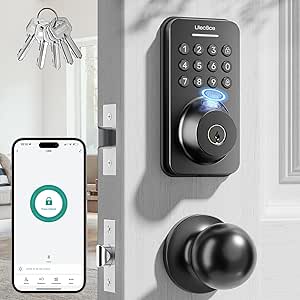 | Best for Shared Access Management | Brand and model: Ulecoce U68 | Material and finish: Zinc, matte black | Unlock methods: Fingerprint, keypad, app, one-touch, and physical key | VIEW ON AMAZON | See Our Full Breakdown |
| Philips WiFi Keypad Door Lock with Handle, Built-in WiFi, APP Remote Control, Voice & Fingerprint Unlock, Satin Nickel |  | Best Built-In WiFi Handle Lock | Brand and model: Philips DDL242X-1HW | Finish: Satin nickel | Connectivity: Built-in 2.4GHz WiFi | VIEW ON AMAZON | See Our Full Breakdown |
| Philips WiFi Smart Keypad Deadbolt Lock, App Remote Control, No Hub Needed |  | Best Keypad-Focused Deadbolt | Brand and model: Philips DDL242X-15HW | Connectivity: WiFi; no hub needed | Control: Philips Home Access App | VIEW ON AMAZON | See Our Full Breakdown |
| Schlage Encode Smart WiFi Deadbolt Lock with Century Trim, Satin Nickel |  | Best for a Security-Focused Smart Home | Brand and model: Schlage BE489WBCEN619 | Finish and trim: Satin nickel, Century trim | Connectivity: WiFi | VIEW ON AMAZON | See Our Full Breakdown |
| smart lock with keypad and app | Connectivity |
|---|---|
| Keyless Entry Door Lock with D | Wi-Fi |
| Philips WiFi Keypad Door Lock | Built-in Wi-Fi |
| DESLOC B200 Fingerprint Smart | Bluetooth with G2 Gateway; app control |
| Philips WiFi Keypad Deadbolt w | 2.4GHz Wi-Fi |
| Philips Wi-Fi Smart Deadbolt L | Built-in Wi-Fi; 2.4GHz network only |
| Wyze Auto-Lock Bolt v2 Fingerp | Wi-Fi |
| Yamiry Front Door Smart Door H | — |
| Veise VE017 Fingerprint Smart | — |
| Veise VE017 Fingerprint Smart | — |
| Keypad Smart Door Knob Lock wi | Bluetooth; Wi-Fi remote access requires a separate gateway |
| Fingerprint Smart Door Lock wi | Bluetooth and WiFi |
| Ulecoce U68 Fingerprint Keypad | Bluetooth; remote features require a Ulecoce gateway |
| Philips WiFi Keypad Door Lock | Built-in 2.4GHz WiFi |
| Philips WiFi Smart Keypad Dead | WiFi; no hub needed |
| Schlage Encode Smart WiFi Dead | WiFi |
More Details on Our Top Picks
Keyless Entry Door Lock with Digital Keypad and WiFi – Smart Lock for Front Door
This Zylenor makes the most sense for buyers who want several ways into the home without relying on one electronic method. It combines a keypad, app, voice control, and mechanical key, while USB-C emergency charging offers a fallback if its eight AA batteries run low. Compared with the DESLOC B200, it skips fingerprint entry but includes Wi-Fi connectivity in its listed control methods rather than requiring a separate gateway for app-related functions. Its zinc-alloy body, IPX4 protection, auto-lock, and anti-hijacking alarm add practical reassurance for a front door. The tradeoffs are the battery count, which is sold separately, and a potentially more demanding installation. I would skip it if fingerprint access or an especially simple DIY fit is the priority.
Pros:- Offers keypad, app, voice, and mechanical-key access methods.
- USB-C emergency charging provides a fallback when batteries are depleted.
- Zinc-alloy construction and IPX4 protection suit front-door use.
- Auto-lock and an anti-hijacking alarm add security-focused functions.
Cons:- Requires eight AA batteries, which are sold separately.
- Installation may be challenging for buyers without DIY experience.
Best for: Front-door owners who want keypad and Wi-Fi app access, plus a physical-key and USB-C fallback.
Not ideal for: Buyers who want fingerprint unlocking or a straightforward installation, since neither is supported by the listed product details.
- Brand / model:Zylenor / Zylenor100
- Connectivity:Wi-Fi
- Control methods:App, push button, voice
- Material:Zinc alloy
- Lock body standard:BHMA Level 3
- Battery:Eight AA batteries, sold separately; up to 10 months
- Emergency power:USB-C port
- Protection:IPX4
- Door thickness compatibility:35–50 inches, as listed
Our verdict“Choose the Zylenor if multiple backup entry methods matter more than fingerprint access or easy installation.”
Philips WiFi Keypad Door Lock with Handle, App Control Smart Deadbolt Lock
This Philips is a practical pick for buyers who want built-in Wi-Fi and keypad access in a lock-and-handle package, without adding fingerprint enrollment to the setup. Its Philips Home Access App supports remote management, while passcodes, a physical key, voice commands, and auto-lock cover everyday entry needs. Compared with the Philips 4200 Series in this roundup, this model’s description emphasizes customizable passwords and standard-deadbolt compatibility rather than fingerprint unlocking. That simpler access mix may suit an office or household that prefers codes to biometrics. The listed IP54 protection and broad temperature range also support use across varied conditions. The main compromises are a stated battery life of up to six months and dependence on Wi-Fi for remote features; buyers should also check their existing deadbolt setup before purchase.
Pros:- Built-in Wi-Fi supports remote management through the Philips Home Access App.
- Combines passcodes, physical keys, and voice commands.
- Customizable passwords and auto-lock support everyday access management.
- IP54 protection and a wide listed operating temperature range.
Cons:- Eight AA batteries are not included, and listed battery life is up to six months.
- Remote app functions depend on a working Wi-Fi connection.
- Installation may be difficult for some users despite compatibility with standard US deadbolts.
Best for: Households or small offices seeking remote app access and passcodes on a standard US deadbolt, without fingerprint features.
Not ideal for: Buyers who need fingerprint entry, longer stated battery life, or remote access where Wi-Fi is unreliable.
- Model:DDL242X-15HW-L
- Connectivity:Built-in Wi-Fi
- Access methods:Keys, passcodes, voice commands, app
- Battery:Eight AA batteries, not included; up to six months
- Waterproof level:IP54
- Temperature range:-31°F to 150°F (-35°C to 66°C)
- Pressure resistance:2200N
- Included components:One door lock and two lever handles
- Warranty:Two years
Our verdict“Pick this Philips for Wi-Fi app control and passcodes in a familiar deadbolt format, but not for fingerprint access.”
DESLOC B200 Fingerprint Smart Door Lock, Keyless Entry Deadbolt
The DESLOC B200 stands apart by making fast fingerprint access its defining convenience, alongside PIN, app, voice, and physical-key entry. Its AI fingerprint recognition is listed at under 0.3 seconds, which can make coming home easier than entering a code, especially for users who do not want to carry keys. Compared with the Zylenor100, it adds biometric unlocking and a longer stated battery life, but its connectivity setup is less self-contained: app control uses Bluetooth, and voice control requires the G2 Gateway. The included physical keys offer a dependable fallback, while IP54 protection and a broad operating range suit varied climates. Buyers should check whether the gateway is needed for their intended remote or voice functions and factor in batteries, which are not included.
Pros:- Fingerprint recognition is listed at under 0.3 seconds.
- Offers fingerprint, PIN, app, voice, and physical-key access options.
- Up to 12 months of stated battery life.
- IP54 protection and an operating range from -22°F to 158°F.
Cons:- Voice control with Alexa or Google Assistant requires the G2 Gateway.
- Batteries are not included.
- App and remote capabilities depend on Bluetooth and any required additional gateway.
Best for: Households that want quick fingerprint entry with PIN and key backups, and are comfortable checking gateway requirements.
Not ideal for: Buyers who expect built-in Wi-Fi remote access or voice control without purchasing an additional gateway.
- Brand / model:DESLOC / B200
- Connectivity:Bluetooth with G2 Gateway; app control
- Access methods:Fingerprint, PIN, app, voice, physical keys
- Fingerprint recognition:Listed at under 0.3 seconds
- Battery life:Up to 12 months
- Water resistance:IP54
- Operating temperature:-22°F to 158°F
- Standard:BHMA Grade 3
- Included access hardware:Key fob and two physical keys
Our verdict“Choose the B200 if fingerprint convenience matters most and gateway-dependent voice features are acceptable.”
Philips WiFi Keypad Deadbolt with Handle, Built-in WiFi, App Remote Control
This Philips 4200 Series combines keypad, fingerprint, and built-in Wi-Fi app access, making it a flexible fit for homes where different people prefer different entry methods. Fingerprint recognition is listed at 0.3 seconds, while customizable auto-lock can be set from zero to 180 seconds. Compared with the Philips DDL242X-15HW-L, this model adds fingerprint unlocking and explicit Alexa and Google Assistant compatibility, but gives up that model’s stated IP54 rating and temperature range in the available specifications. Its standard-door compatibility and included lever hardware make it a more complete replacement option, although it is described as primarily suited to right-opening doors. Battery life is listed at up to six months, and batteries are not included. Buyers should also note that auto-lock must be activated in the app.
Pros:- Combines keypad, fingerprint, app, and voice-assistant access.
- Built-in 2.4GHz Wi-Fi supports remote control.
- Customizable auto-lock timing from zero to 180 seconds.
- Fits most listed doors from 1-3/8 to 1-3/4 inches thick.
Cons:- Batteries are not included, and stated battery life is up to six months.
- Auto-lock requires manual activation in the app.
- Designed primarily for right-opening doors.
Best for: Households that want fingerprint and keypad entry, remote app control, and voice-assistant compatibility in one lock.
Not ideal for: Owners of left-opening doors or buyers who want auto-lock enabled without configuring it in the app.
- Model:DDL242X-1HW-L
- Connectivity:2.4GHz Wi-Fi
- Access methods:Keypad, fingerprint, app, voice assistant
- Fingerprint recognition:Listed at 0.3 seconds
- Auto-lock:Customizable from 0 to 180 seconds
- Battery:Standard 1.5V alkaline batteries, not included; up to six months
- Door thickness compatibility:1-3/8 to 1-3/4 inches
- Voice assistant compatibility:Alexa and Google Assistant
- Included hardware:Two door levers, latch, screws, and installation hardware
Our verdict“Choose this Philips if your household wants fingerprint alongside keypad and app access and your door’s handing is compatible.”
Philips Wi-Fi Smart Deadbolt Lock, Keyless Entry Door Locks for Front Door
This Philips is the strongest fit here for households that regularly share access, thanks to up to 100 custom passcodes and one-time or scheduled codes for guests, cleaners, or deliveries. Built-in Wi-Fi supports remote app control without a separate hub, and the lock also offers fingerprint, physical-key, and voice entry. Compared with the Philips 4200 Series, this listing spells out more access-management detail, including access history, real-time alerts, and Away Mode, but it does not provide a model number or battery-life figure. Auto-lock can be set from 10 to 180 seconds, though the lock has no door sensor, so it cannot confirm that the door is physically closed. Its 2.4GHz Wi-Fi requirement and recommended router distance also make network placement worth checking.
Pros:- Stores up to 100 custom passcodes and supports one-time or scheduled guest codes.
- Built-in Wi-Fi enables remote app control without an extra hub.
- Supports fingerprint, passcode, physical-key, and voice access.
- Provides real-time alerts, access history, Away Mode, and adjustable auto-lock.
Cons:- No door sensor, so auto-lock cannot verify that the door is physically closed.
- Requires 2.4GHz Wi-Fi and recommends keeping the router and lock within 65 feet.
- AA alkaline batteries are not included, and the provided listing gives no battery-life estimate.
Best for: Hosts and families who need many custom, scheduled, or one-time entry codes and remote access notifications.
Not ideal for: Buyers who need a door sensor, a stated battery-life estimate, or compatibility with Wi-Fi bands other than 2.4GHz.
- Connectivity:Built-in Wi-Fi; 2.4GHz network only
- Access methods:App, passcode, fingerprint, physical key, voice
- Passcodes:Up to 100 custom codes; one-time and scheduled codes supported
- Auto-lock:Adjustable from 10 to 180 seconds
- Voice assistants:Alexa and Google Assistant
- Battery requirement:AA alkaline (LR6), not included
- Door thickness compatibility:1-3/8 to 2 inches
- Material:Aluminum
- Additional features:Access alerts and history, Away Mode; no door sensor
Our verdict“Pick this Philips for flexible guest-code scheduling and access alerts, but skip it if door-position sensing is a must.”
Wyze Auto-Lock Bolt v2 Fingerprint Keyless Entry Smart Lock with AI Learning Scanner
The Wyze Auto-Lock Bolt v2 is a strong fit for buyers who want keypad access plus app control without a separate gateway. Its built-in Wi-Fi supports remote control in the Wyze app, while the fingerprint reader offers a quick alternative when entering a code is inconvenient. Up to 50 keypad codes and physical backup keys give households several ways to manage access. Compared with the Veise VE017, Wyze has the simpler remote-connectivity story; Veise offers more detailed user-management tools but requires its G1 Gateway for remote features. Wyze’s tradeoffs are its reliance on eight AA batteries and remote features’ dependence on Wi-Fi. The fingerprint reader may also be less dependable with dirty fingers or in extreme temperatures, so buyers should keep a code or key available.
Pros:- Built-in Wi-Fi enables app-based remote control without a separate gateway
- Fingerprint, keypad, app, and physical-key entry provide useful backups
- Supports up to 50 keypad codes and automatic locking
- IP53 weather resistance and BHMA2 certification
Cons:- Eight AA batteries may need replacement every several months
- Remote app features depend on a functioning Wi-Fi connection
- Fingerprint performance may vary with dirty fingers or extreme temperatures
Best for: Households wanting direct Wi-Fi app access, several keypad codes, and fingerprint entry without adding a connectivity gateway.
Not ideal for: Buyers prioritizing long battery intervals or homes where Wi-Fi is unreliable and remote app control is a main reason for buying.
- Lock type:Biometric deadbolt with keypad
- Connectivity:Wi-Fi
- Fingerprint reader:AI-learning tempered-glass sensor
- Keypad capacity:Up to 50 codes
- Power:Eight AA batteries; USB-C emergency power
- Battery life:Up to 8 months
- Durability:BHMA2 certified; IP53 rated
Our verdict“Choose the Wyze Bolt v2 if you want built-in Wi-Fi and multiple quick entry methods, and can accept regular battery changes.”
Yamiry Front Door Smart Door Handle Lock with Keypad and Fingerprint
The Yamiry stands out for offering a wide mix of entry methods that can suit a rental or a busy household: fingerprint, app, passcode, key fob, mechanical key, and Alexa voice commands. Its app-based access management and activity tracking are appealing when owners need to coordinate entry for guests or occupants. Compared with the Wyze Auto-Lock Bolt v2, Yamiry adds fobs and voice-control support, but the Wyze is clearer about its built-in Wi-Fi and published battery life. Yamiry requires a Wi-Fi gateway for remote control and Alexa unlock, so the app and voice features are not a standalone setup. Its battery life is also unspecified, leaving less certainty for landlords planning maintenance. Check the lock’s fit and connectivity requirements before relying on it for remotely managed entry.
Pros:- Offers fingerprint, passcode, app, key fob, and mechanical-key entry
- App supports remote access management and activity tracking
- Voice control is available with the required Wi-Fi gateway
- Adjustable latch and installation design suit many standard left- or right-handed doors
Cons:- Remote control and Alexa voice unlock require a separate Wi-Fi gateway
- Battery life is not specified in the supplied product information
- App setup may take more effort than a simpler keypad-and-app lock
Best for: Landlords and property managers who want to issue codes or fobs to different users and track access through an app.
Not ideal for: Buyers who want remote access without extra hardware, or who need a clearly stated battery-life estimate before choosing a lock.
- Model:YR01
- Lock type:Smart deadbolt
- Entry methods:Fingerprint, app, passcode, key fob, mechanical key, and Alexa voice command
- Remote access:Requires a Wi-Fi gateway
- Included accessories:Two key fobs, two mechanical keys, screw set, and adjustable latch
- Door orientation:Compatible with left- and right-handed doors
Our verdict“Pick Yamiry for flexible rental access methods, but skip it if you need remote app features without a gateway or want a stated battery-life figure.”
Veise VE017 Fingerprint Smart Door Lock with App Control, Matte Black
For homes or rentals with changing occupants, the matte-black VE017’s strongest case is its detailed user and code management. The KK Home app supports temporary, recurring, and permanent codes, plus activity logs and the ability to change or revoke permissions remotely. Its anti-peeping PIN feature and locally stored AES128-encrypted access data add privacy-minded touches. Compared with the Yamiry YR01, the VE017 gives more detail on code types, alerts, and access controls; like Yamiry, it needs a separate gateway for remote connectivity and voice-assistant features. The lock also offers fingerprint, app, code, fob, and mechanical-key access, but its many settings may feel like unnecessary complexity for someone who only wants a basic keypad. Four AA batteries are not included, and the gateway is sold separately.
Pros:- App-based controls support temporary, recurring, and permanent access codes
- Activity logs and remote permission changes suit multi-user households
- Fingerprint, keypad, app, fob, and mechanical-key entry offer several alternatives
- Local AES128 encryption, anti-peeping PIN, and intrusion alerts add security controls
Cons:- Remote access and Alexa or Google integration require the separately sold G1 Gateway
- Four AA batteries are not included
- The range of management features may be more involved than casual users need
Best for: Property owners and households that regularly add, change, or remove users and want access logs and varied code permissions.
Not ideal for: Buyers seeking simple setup with no extra connectivity hardware, or anyone who prefers a basic keypad over app-based user administration.
- Finish:Matte black
- Lock type:Fingerprint smart deadbolt with touchscreen keypad
- Entry methods:Fingerprint, app, code, fob card, code sharing, and mechanical key
- App:KK Home
- Remote connectivity:Requires Veise G1 Gateway
- Battery:Four AA/LR6 alkaline batteries, not included; approximately 12 months
- Emergency power:USB-C port
- Security and durability:AES128 local encryption, BHMA/ANSI certified, IP55 rated
Our verdict“Choose this VE017 if managing many users and revocable access matters more than keeping the setup minimal.”
Veise VE017 Fingerprint Smart Door Lock with App Control, Satin Nickel
The satin-nickel VE017 suits buyers who want a feature-rich keypad and app lock with a stated battery estimate: the manufacturer lists at least 12 months from four AA batteries. It includes fingerprint, app, code, fob-card, and mechanical-key entry, along with local encrypted access data and activity logs. Compared with the Wyze Auto-Lock Bolt v2, the Veise claims a longer battery interval, while Wyze has built-in Wi-Fi; the Veise requires its G1 Gateway for remote access and voice-assistant control. That extra hardware matters if managing the lock away from home is central to the purchase. The satin-nickel version is a finish choice rather than a different access system from the matte-black VE017, so buyers should decide based on door hardware coordination and whether the gateway-dependent setup fits their needs.
Pros:- Published battery life of at least 12 months with four AA batteries
- Fingerprint, app, keypad, fob-card, and mechanical-key entry
- Local AES128 encryption and activity logs support access oversight
- DIY installation is specified to take about 15 minutes without drilling
Cons:- G1 Gateway is required for remote access and voice-assistant features
- Four AA batteries are not included
- App features and access management may be more than a basic household needs
Best for: Homeowners who want varied entry methods, access logs, and a published battery estimate in a satin-nickel finish.
Not ideal for: Buyers who need remote app control without a separate gateway, or who want batteries included.
- Finish:Satin nickel
- Lock type:Fingerprint smart deadbolt with keypad
- Entry methods:Fingerprint, app, code, fob card, code sharing, and mechanical key
- Battery life:At least 12 months
- Battery type:Four AA/LR6 alkaline batteries, not included
- Remote connectivity:Requires Veise G1 Gateway
- Security:AES128 local encryption, anti-peeping password, intrusion alarm, and activity logs
- Emergency power:USB-C port
Our verdict“Choose the satin-nickel VE017 for its broad access options and stated battery interval if you are comfortable adding the gateway for remote control.”
Keypad Smart Door Knob Lock with Fingerprint and Keyless Entry
This YR05 is the lineup’s knob-style alternative for buyers who prefer that form over a deadbolt-only design. It combines a keypad and app control with fingerprint, password, key-fob, and physical-key entry, and its included latch and hardware support a standard-tool installation. Compared with the Wyze Auto-Lock Bolt v2, the YR05 adds two included fobs but does not list built-in Wi-Fi or a battery-life estimate. Its app connection is Bluetooth, while remote control requires a separately sold Wi-Fi gateway, so it is a weaker match for anyone who expects direct remote access out of the box. The aluminum body and matte-black finish suit a modern look, but buyers should confirm the knob format works for their door and security needs before choosing it over a deadbolt.
Pros:- Combines fingerprint, password, app, key-fob, and physical-key entry
- Includes two key fobs, two physical keys, latch, and installation hardware
- Aluminum construction with a matte-black brushed finish
- Bluetooth app control is available, with remote access possible through a separate gateway
Cons:- Wi-Fi remote control requires a separately sold gateway
- Battery life is not specified in the supplied product information
- Knob format may not suit buyers seeking a deadbolt-style lock
Best for: Buyers replacing a compatible knob who want fingerprint, keypad, app, and fob entry in one lock assembly.
Not ideal for: Shoppers specifically seeking a deadbolt, built-in Wi-Fi, or a published battery-life estimate.
- Model:YR05
- Lock type:Electronic door knob lock
- Entry methods:Fingerprint, app, password, key fob, and physical key
- Connectivity:Bluetooth; Wi-Fi remote access requires a separate gateway
- Material:Aluminum
- Finish:Brushed matte black
- Dimensions:5.62 × 2.69 × 3 inches
- Included accessories:Two physical keys, two key fobs, latch, and installation hardware
Our verdict“Choose the YR05 if you need a knob-style lock with several entry methods, but look elsewhere for built-in Wi-Fi or a deadbolt.”
Fingerprint Smart Door Lock with Handle & Keypad – Keyless Entry, Remote Access, Alexa & Google Compatible
The Sifely S suits households that want to choose how each person gets in: fingerprint, keypad, app, fob, or key. That flexibility makes it more adaptable for families and rental hosts than the Philips WiFi Smart Keypad Deadbolt, which emphasizes app, code, and key access rather than fingerprint and fob options. Its reversible handle and DIY installation may also help when replacing a conventional handle set.
The tradeoff is that remote access and voice control depend on an optional WiFi Gateway; Bluetooth alone does not provide the same away-from-home control. The listing also specifies a fit for most standard doors, not every door, and reports note possible connectivity hiccups. I’d shortlist it when varied local entry methods matter more than a simple, built-in WiFi setup.
Pros:- Offers fingerprint, keypad, app, fob, and physical-key entry.
- Reversible handle and DIY installation suit many standard doors.
- Includes auto-lock, one-touch locking, and an anti-peeping password feature.
- Can support remote management and voice control when paired with the optional WiFi Gateway.
Cons:- Remote access and voice control require a separately obtained WiFi Gateway.
- Fit is limited to compatible standard doors.
- Connectivity issues are reported as a possible drawback.
Best for: Families or short-term rental hosts who want fingerprint, fob, code, app, and key entry options on one handle lock.
Not ideal for: Buyers who want remote app and voice control without purchasing a separate gateway, or whose door falls outside standard sizing.
- Brand and model:Sifely S
- Material and finish:Zinc, satin nickel
- Connectivity:Bluetooth and WiFi
- Unlock methods:Fingerprint, passcode, app, fob, and key
- Smart home compatibility:Alexa and Google Assistant
- Features:Auto-lock, one-touch lock, back-lit touchscreen keypad, anti-peeping password, weather resistance
- Included keys and cards:2 keys and 2 key cards
- Installation:DIY; reversible handle; fits most standard doors
Our verdict“Choose the Sifely S if your household values multiple ways to unlock locally and can accommodate its separate gateway for remote control.”
Ulecoce U68 Fingerprint Keypad Deadbolt with Knob Set, Matte Black
The Ulecoce U68 is the strongest fit here for homes that need to issue and revoke different kinds of entry codes. Its app supports one-time, scheduled, recurring, and permanent passwords, while access logs and fingerprint entry give hosts more ways to manage arrivals than the simpler keypad-and-app approach of the Philips WiFi Smart Keypad Deadbolt. The listed capacity of 512 fingerprint and passcode sets also suits a larger group of regular users.
That capability comes with a setup dependency: remote and voice control require a separate Ulecoce gateway, so the listed Bluetooth-based access is not the same as direct WiFi access from anywhere. The product provides little detail on door-thickness compatibility, so I’d verify fit before ordering. Choose it for granular access permissions; skip it if straightforward built-in remote control is the priority.
Pros:- Supports one-time, permanent, scheduled, recurring, and custom access codes.
- Stores up to 512 fingerprint and keypad passcode sets.
- App features include access logs, user permissions, and battery-level checks.
- Offers fingerprint, keypad, app, one-touch, and physical-key entry.
Cons:- Remote and voice control require a separate Ulecoce gateway.
- The supplied product details do not specify door-thickness compatibility.
- Uses 5 keys, which may not suit buyers seeking a minimal backup-key set.
Best for: Rental hosts, household managers, or larger families who need temporary, recurring, and scheduled codes alongside app access logs.
Not ideal for: Buyers who want remote app and voice access without a separately purchased gateway, or who need clearly documented door-fit measurements before buying.
- Brand and model:Ulecoce U68
- Material and finish:Zinc, matte black
- Unlock methods:Fingerprint, keypad, app, one-touch, and physical key
- Fingerprint and code capacity:Up to 512 sets
- Connectivity:Bluetooth; remote features require a Ulecoce gateway
- Smart home compatibility:Alexa and Google Assistant with gateway
- Features:Auto-lock adjustable from 5 to 60 seconds, one-touch lock, anti-peeping password, IP54
- Included keys:5
Our verdict“Pick the Ulecoce U68 when flexible guest-code management matters more than having remote connectivity built into the lock.”
Philips WiFi Keypad Door Lock with Handle, Built-in WiFi, APP Remote Control, Voice & Fingerprint Unlock, Satin Nickel
This Philips handle set makes sense for buyers who want a keypad, fingerprint reader, app control, and WiFi in one package. Unlike the Sifely S and Ulecoce U68, its description specifies built-in WiFi rather than a separate gateway for remote features. That can simplify the route to remote management, while the included lever hardware makes it a more direct replacement for a handle lock than the Philips WiFi Smart Keypad Deadbolt.
The fit and network requirements are less flexible than the broad unlocking menu might suggest: it is specified for 1-3/8- to 1-3/4-inch doors and a 2.4GHz WiFi network. Eight AA batteries are not included, so factor in sourcing those before installation. I’d choose it over the deadbolt-only Philips when replacing a handle set, but not for a 5GHz-only network or an unusually thick door.
Pros:- Built-in WiFi supports app-based remote control without a listed separate gateway.
- Combines fingerprint, PIN, app, and voice unlocking.
- Includes a handle set and installation hardware.
- Auto-lock and access management add convenience for everyday use.
Cons:- Requires a 2.4GHz WiFi network.
- Eight AA batteries are not included.
- Door thickness must fall within the specified 1-3/8- to 1-3/4-inch range.
Best for: Homeowners replacing a standard lever-handle lock who want fingerprint, PIN, and remote app access over 2.4GHz WiFi.
Not ideal for: Buyers with a 5GHz-only network, doors outside the stated thickness range, or those who want batteries included.
- Brand and model:Philips DDL242X-1HW
- Finish:Satin nickel
- Connectivity:Built-in 2.4GHz WiFi
- Unlock methods:App, fingerprint, PIN code, and voice
- Smart home compatibility:Alexa and Google Assistant
- Door thickness compatibility:1-3/8 to 1-3/4 inches (38 to 50 mm)
- Battery requirement:8 AA alkaline batteries, not included
- Installation:DIY with screwdriver; handle set and installation hardware included
Our verdict“Choose this Philips model over a deadbolt-only option when you need a WiFi-connected lock that replaces the handle as well.”
Philips WiFi Smart Keypad Deadbolt Lock, App Remote Control, No Hub Needed
The Philips DDL242X-15HW is a straightforward choice for buyers who want a keypad deadbolt with app-based remote control and no separate hub. It is more focused than the fingerprint-equipped Philips WiFi Keypad Door Lock with Handle: this model emphasizes passcodes, keys, voice control, and remote management rather than adding a handle set and fingerprint access. That narrower setup may suit someone replacing only a deadbolt and wanting fewer entry methods to manage.
Its listed IP54 rating and temperature range provide useful environmental details, and the stated battery life is up to six months. The supplied product data does not specify the exact WiFi band, door-thickness range, or which voice assistants are supported, so I would confirm those details before choosing it over the more fully specified Schlage Encode. Batteries are not included, and remote features still depend on WiFi.
Pros:- App remote control is specified without a separate hub.
- Supports passcodes, physical keys, and voice commands.
- Lists IP54 water resistance and a broad operating temperature range.
- Advertises up to six months of battery life and low-battery alerts.
Cons:- Batteries are not included.
- Remote features depend on a WiFi connection.
- The supplied specifications do not identify the voice assistants or door-fit range.
Best for: Buyers replacing a deadbolt who want app control, keypad access, physical keys, and weather-resistance information without a separate hub.
Not ideal for: Shoppers who need fingerprint entry, a handle set, clearly stated door measurements, or confirmed voice-assistant compatibility before purchase.
- Brand and model:Philips DDL242X-15HW
- Connectivity:WiFi; no hub needed
- Control:Philips Home Access App
- Unlock methods:Passcodes, physical keys, and voice commands
- Battery life:Up to 6 months
- Water resistance:IP54
- Operating temperature:-31°F to 150°F (-35°C to 66°C)
- Pressure resistance:2200 N
Our verdict“Choose this Philips deadbolt if keypad and app access are your priorities and you do not need fingerprint entry or a replacement handle.”
Schlage Encode Smart WiFi Deadbolt Lock with Century Trim, Satin Nickel
The Schlage Encode is the pick for buyers who place more weight on named security features and smart-home integration than on fingerprint access. Its built-in WiFi, encrypted connection, and built-in alarm give it a clearer security-focused profile than the Philips DDL242X-15HW, whose supplied details emphasize weather resistance and battery life. The Encode also lists Alexa, Google Home, Ring, and Airbnb compatibility, making it a more natural match for a connected home that already uses those services.
The tradeoff is a more conventional deadbolt experience: the product information does not list a fingerprint reader, and the entry method is less varied than the Sifely S or Ulecoce U68. Battery life is listed as up to six months, though actual replacement timing can vary. I’d choose it for app control and security features, but skip it if biometric entry is a must.
Pros:- WiFi enables app-based remote access and control.
- Lists encryption and a built-in alarm among its security features.
- Compatible with Alexa, Google Home, Ring, and Airbnb.
- Four AA batteries are included, and installation does not require hardwiring.
Cons:- Fingerprint unlocking is not listed.
- Battery life is stated as up to six months, so replacement may be a regular task.
- Fit is limited to compatible standard door sizes.
Best for: Smart-home owners who want a WiFi deadbolt with an app, voice-assistant integration, and listed encryption and alarm features.
Not ideal for: Buyers who require fingerprint unlocking, a handle replacement, or a lock with a longer stated battery interval.
- Brand and model:Schlage BE489WBCEN619
- Finish and trim:Satin nickel, Century trim
- Connectivity:WiFi
- Smart-home compatibility:Alexa, Google Home, Ring, and Airbnb
- Security features:Encryption and built-in alarm
- Battery type:4 AA batteries, included
- Battery life:Up to 6 months
- Warranty:Limited lifetime mechanical and finish warranty; 3-year electronics warranty
Our verdict“Pick the Schlage Encode if you want a security-focused WiFi deadbolt with broad smart-home compatibility and can do without fingerprint access.”

How We Picked
I ranked these 15 options around the needs implied by the search: dependable keypad access paired with app control. I gave more weight to clearly stated connectivity, useful entry methods, practical lock formats, and details that help buyers judge fit, such as a deadbolt versus a knob or handle set. I also looked at everyday usability features—including auto-lock, fingerprint access, remote control, and backup entry—while treating claims as product-listing information rather than proof of performance.
The order reflects how much useful decision-making information each listing provides, how well its stated features suit common front-door needs, and how distinct its role is in the lineup. The Schlage Encode leads as a clearly identified Wi-Fi deadbolt; Wyze ranks highly for its extra access and security conveniences; and Philips models earn attention for offering a range of keypad, app, handle, and fingerprint combinations. Generic listings and near-duplicate finish options rank lower because buyers may need to confirm more details before they can compare them confidently. Door fit, connectivity requirements, and included hardware can change which pick makes sense for an individual home.
Factors to Consider When Choosing Smart Lock With Keypad And App
Before choosing a model, match the lock to your door and your daily entry habits—not just the feature list. A keypad and app are the shared baseline here; installation fit, remote access, and backup plans are what separate a convenient upgrade from a frustrating mismatch.
Check the Lock Format and Door Fit
Start by identifying whether your door needs a standalone deadbolt, a deadbolt-and-handle set, or a keypad knob. These formats are not direct substitutes: a deadbolt-only model may leave your existing handle in place, while a full handle set can change the look and hardware you need to replace. Measure the door thickness and check the backset and bore-hole requirements against the product’s installation details. A common mistake is ordering based on appearance alone, then finding that the latch or trim does not fit the existing cutout. If you rent or want to limit changes, check whether the lock works with your current hardware and whether installation can be reversed cleanly.
Separate Local Keypad Use From Remote App Control
A keypad can work at the door even when the app’s remote features depend on Wi-Fi, a bridge, or another connection method. Look for explicit wording about built-in Wi-Fi and whether a hub is required; product names that simply say “app control” may not answer that question. Remote access matters when you need to let in a visitor while away, while local code entry may be enough for family members and routine arrivals. Check which functions remain available if your internet connection drops, and whether app setup depends on a particular network band or phone platform. Buyers often confuse phone-based Bluetooth control nearby with control from anywhere, so verify the range and connection path before purchasing.
Choose Entry Methods That Match Your Household
Keypad codes suit visitors and household members who do not want to carry a key, while fingerprint access can speed up entry for people whose prints the lock recognizes. A fingerprint sensor adds convenience but also adds a setup step and may not be the best primary method for every user, including children or people with changing or hard-to-read fingerprints. Consider whether you need separate codes for guests, temporary access, or household members, and check how the app manages them. Voice control can add hands-free convenience, but it should not replace a dependable physical or keypad fallback. Favor the simplest combination that solves your actual access problem rather than paying attention to feature count alone.
Plan for Power and Lockout Scenarios
Smart locks rely on batteries, so battery life claims should be read as estimates shaped by use, temperature, connectivity, and setup. Check how the lock warns about low power and what entry options remain if batteries run down. A physical key backup can be reassuring, but not every keypad lock uses the same backup approach, and some buyers may prefer a model with more than one alternative entry method. Auto-lock can reduce the chance of leaving a door unsecured, yet a short timer may inconvenience people carrying groceries or moving in and out. Set the behavior to fit your household and confirm that anyone who needs access knows the backup procedure.
Pay for Features You Will Actually Use
Extra functions can justify choosing a more feature-rich model when they solve a recurring need. Fingerprint entry is valuable for frequent hands-full arrivals, remote access helps hosts and caregivers, and a complete handle set can simplify a coordinated hardware replacement. If you mainly need a code for family members and an app for basic status or settings, a simpler keypad deadbolt may be easier to live with. Do not treat voice-assistant compatibility or a long feature list as a substitute for clear information about installation and connectivity. Compare the whole setup—including any hub, replacement batteries, and hardware you may need—rather than deciding from the lock’s headline features.
Treat Finish and Model Names as Separate Buying Details
Finish affects how the lock works with existing hardware, but identical model names in different finishes may not represent different technical versions. The Veise VE017 listings, for example, are separated by matte black and satin nickel, so the key distinction presented is appearance. Philips listings also vary by handle inclusion and stated unlock methods, making it worth checking the exact configuration rather than relying on the brand or a similar product name. Read the included-parts list and product specifications for the precise listing you plan to buy. This extra check can prevent a mismatch between the finish, lock format, and features you expected.
Frequently Asked Questions
Do I need built-in Wi-Fi to control a smart lock from outside my home?
Not always, but the lock needs a connection path that reaches your phone when you are away. Models with built-in Wi-Fi can connect directly, while other locks may need a separately sold hub or bridge for remote access. Bluetooth-only control usually works when your phone is near the lock, not from anywhere. Check the exact listing for whether remote app functions need extra hardware and whether the app supports the actions you care about, such as sharing access or checking lock status. The Philips listings in this roundup vary, so compare the specific model rather than assuming every keypad version connects the same way.
Should I choose a fingerprint lock or a keypad-only smart lock?
Choose fingerprint access if quick entry without a code is useful for the people who will use the door most often. A keypad may be simpler for guests, children, or households that prefer not to enroll fingerprints, and codes are easy to share temporarily when the app supports that function. Fingerprint performance can vary with finger placement and user conditions, so keep another access method available. The Wyze and several handle-style listings add fingerprint entry, while other options focus more directly on keypad and app control. Decide based on who needs access and how often you expect to manage codes or fingerprints.
Can I replace my existing deadbolt with a handle-set smart lock?
Possibly, but a handle-set lock may require replacing more hardware than a deadbolt-only model. Compare the product’s door measurements, bore-hole layout, backset, and included components with your current setup before ordering. If your existing handle is in good shape, a deadbolt-only option may avoid unnecessary changes. If you want a coordinated handle and lock appearance, a set such as the Philips handle configurations may be a better fit, provided the measurements match. Do not assume two products with similar photos use the same installation pattern.
What happens if the lock’s batteries run out or the internet goes down?
The answer depends on the lock’s backup design, so check for a physical key, emergency power method, or another entry option before buying. A home internet outage may disable remote app access without necessarily stopping keypad entry, but that behavior should be confirmed for the specific model. Low-battery alerts give you time to replace batteries, though notification access may itself depend on the lock’s connection. Keep the backup method available to household members and avoid relying on remote access as your only way inside. The Wyze listing specifically mentions backup keys, while other listings require closer inspection of their stated backup provisions.
How do I choose between several Philips keypad locks in this roundup?
Compare the exact hardware configuration and unlock methods rather than choosing by brand name alone. Some Philips options are deadbolts, while others include a handle; the listed models also differ in stated Wi-Fi, remote-control, fingerprint, and voice-unlock features. If you only need keypad entry and app control, a simpler configuration may meet your needs without extra functions. If you are replacing both the deadbolt and handle, a set may reduce the need to shop for matching hardware separately. Confirm the finish, included pieces, connectivity requirements, and compatibility for the specific listing you intend to order.
Conclusion
For most shoppers seeking a clear mix of keypad access and app control, I’d start with the Schlage Encode as the best overall choice, especially if a Wi-Fi deadbolt is the priority. The best premium-leaning pick is also Schlage for buyers drawn to its established deadbolt format, while the Wyze Auto-Lock Bolt v2 is the better fit for households that want fingerprint access, auto-lock, and backup keys. For value, compare the simpler Philips keypad deadbolts with the generic keypad options only after confirming their connectivity and included hardware. Beginners who want a familiar deadbolt setup and clearly described app connectivity should begin with the Schlage or a specific Philips Wi-Fi model; buyers replacing a full lock-and-handle set should focus on Philips configurations that include the handle. Choose the Veise finish variants or fingerprint handle models when appearance or biometric entry is your main need, and verify door fit before ordering.