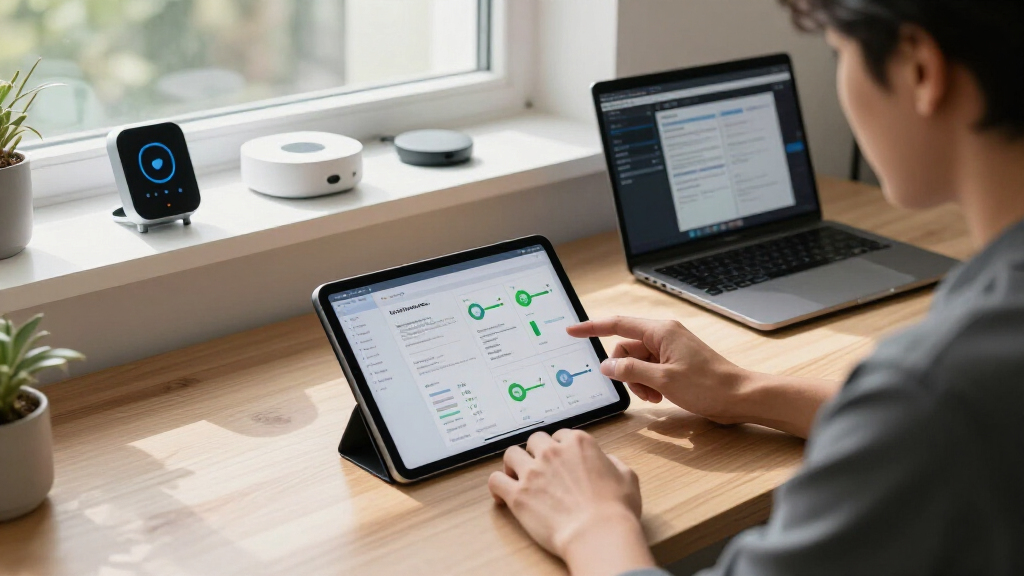

Welcome to our comprehensive AI Tools & Automation Essentials 2026 Checklist designed for tech enthusiasts, professionals, and smart home advocates alike. Whether you’re upgrading your setup or just starting out in automation, this guide is structured to help you make informed decisions. Each section highlights key products and ideas tailored to specific needs, ensuring you find the perfect fit for your tech ecosystem.

Get business pricing on tech for your team
- Business-only prices and quantity discounts
- Tax-exempt purchasing
- Multiple users, one account, clear invoices
Our checklist is organized into categories like hardware devices, software solutions, and cloud services. Use this as a reference point: read through the explanations to understand why each item matters, then look for the specific features to consider before making a purchase. This approach helps you avoid common pitfalls like mismatched compatibility or overlooking essential features.
Feel free to browse through each section, compare the highlighted products, and prioritize based on your unique requirements and budget. Remember, the goal is to build a seamless, efficient, and future-proof setup that enhances your daily productivity and automation capabilities.
Laptop & Desktop Devices
In the realm of high-performance computing, selecting the right desktop is crucial for demanding tasks like gaming, content creation, and AI development. The High-Performance Gaming Desktop PC with Ryzen 7 5700X and GeForce RTX offers a robust platform that balances power and reliability. Such a desktop is ideal for users who need a versatile machine capable of handling intensive workloads without lag. When choosing a desktop, consider not just the CPU and GPU but also the expandability options and cooling systems to ensure longevity and optimal performance.
Many buyers make the mistake of overlooking compatibility with existing peripherals or underestimating the importance of future upgrades. It’s wise to verify the size and connectivity options, especially if you plan to add multiple monitors or specialized accessories. For desktop setups, ensure your power supply can handle future upgrades and that the case size fits your workspace. Compatibility with your preferred operating system and software is also essential to avoid frustrating bottlenecks.
What to look for:
- Powerful multi-core CPU (Ryzen 7 5700X or equivalent)
- High-end GPU (GeForce RTX series or equivalent)
- Adequate RAM (at least 16GB, preferably 32GB)
- Upgradeable storage options (SSD + HDD)
- Good cooling system and airflow
High-Performance Gaming Desktop PC with Ryzen 7 5700X and GeForce RTX 3050
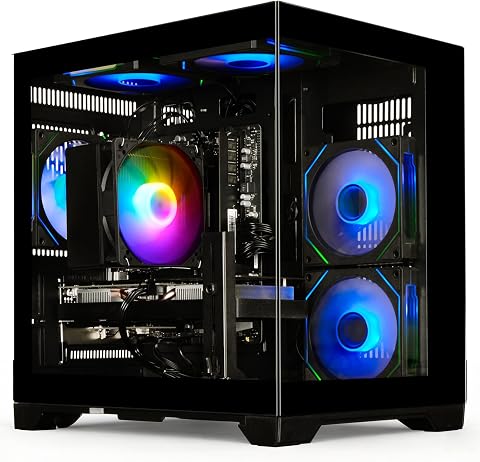
This gaming desktop features a Ryzen 7 5700X processor, 16GB DDR4 RAM, and an RTX 3050 8GB graphics card, delivering smooth performance for gaming, streaming, and productivity tasks. It includes a 512GB NVMe SSD for fast boot and load times, WiFi 6 connectivity, and versatile ports for various peripherals.
Pros:
- Powerful multi-core processor suitable for gaming and multitasking
- Fast NVMe SSD for quick boot and load times
- High-quality RTX 3050 graphics card supports ray tracing and DLSS
- WiFi 6 ensures fast, low-latency wireless connectivity
Cons:
- Limited storage capacity with only 512GB SSD
- No mention of upgrade options for RAM or storage
- Performance may be limited for very high-end gaming or professional workloads
Best for: Gaming, content creation, AI development
Not ideal for: Casual or lightweight computing needs
Bottom line: Choose a desktop that balances power, expandability, and compatibility.
Smart Home Devices
The Amazon Echo Show 15 (Newest Model) is a standout smart display that brings together visual interaction and voice control. Its 15.6-inch Full HD screen makes it perfect for managing smart home devices, viewing security cameras, or even following recipes in the kitchen. This device seamlessly integrates with other smart gadgets, creating a centralized hub that simplifies daily routines. When selecting a smart display, consider compatibility with your existing smart home ecosystem and the display size that best fits your space.
Many buyers overlook the importance of privacy features or the ease of use for all household members. Make sure the device supports robust privacy controls and has an intuitive interface. Compatibility with voice assistants like Alexa, Google Assistant, or others is vital for smooth operation. Also, think about placement—whether on a countertop or mounted on a wall—to maximize accessibility and aesthetic appeal. A smart display should enhance your home’s intelligence without becoming a clutter or privacy concern.
What to look for:
- Large, clear Full HD display (15.6″)
- Strong smart home ecosystem integration
- Voice control compatibility (Alexa, Google Assistant)
- Privacy controls and security features
- Ease of use for all users
Amazon Echo Show 15 (Newest Model) – 15.6" Full HD Smart Display with Fire TV an

The Echo Show 15 is a 15.6-inch Full HD smart display designed for kitchen and home organization, featuring customizable widgets, built-in Fire TV for streaming, and a centered camera for natural video calls. It serves as a family hub for calendars, smart home controls, photo slideshows, and entertainment, all with privacy protections.
Pros:
- Large 15.6-inch Full HD display ideal for kitchen and family use
- Built-in Fire TV for streaming from popular apps like Prime Video and Netflix
- Family organization features with customizable widgets and photo slideshow
- Centered camera with auto-framing enhances video calls
Cons:
- Requires internet connection and compatible subscriptions for full features
- Large size may not fit in smaller spaces
- Some features may require additional setup or subscriptions
Best for: Managing smart home devices and entertainment
Not ideal for: Small spaces or minimal smart home setup
Bottom line: A versatile smart display that centralizes your smart home.
Productivity Software
The OpenCode Custom Workflows platform is a game-changer for anyone looking to automate tasks with AI. Its flexible environment allows users to build tailored workflows that streamline repetitive processes, saving time and reducing errors. Whether you’re a developer, a business professional, or a hobbyist, this software empowers you to harness AI in a practical way. When evaluating productivity software, consider how well it integrates with your current tools and whether it offers customizable options suited to your specific needs.
Many users jump into automation without a clear plan, leading to underutilized features or complex setups that are hard to maintain. Focus on features like drag-and-drop workflow creation, AI model integration, and real-time monitoring. Compatibility with your operating system and existing applications is critical for smooth operation. Also, look for community support and tutorials, which can be invaluable when building complex automations. Remember, the goal is to enhance productivity, not complicate workflows.
What to look for:
- Customizable workflow creation
- AI model integration
- Compatibility with existing tools
- User-friendly interface
- Community support and tutorials
OpenCode Custom Workflows: Building Intelligent Automation with AI Agents

This book provides insights into creating custom workflows and building intelligent automation using AI agents. It covers tools and techniques for developing AI-driven automation solutions.
Pros:
- Comprehensive guide on AI agent tools
- Practical insights for building automation workflows
Cons:
- Lacks detailed technical examples
- May be complex for beginners
Best for: Streamlining repetitive tasks and workflows
Not ideal for: Basic automation needs or non-technical users
Bottom line: A flexible platform to build intelligent automation solutions.
Wearable Tech
While no specific product is listed here, investing in wearable tech can significantly boost your productivity and health monitoring. Devices like smartwatches and fitness trackers help you stay connected, track health metrics, and maintain an active lifestyle. When selecting wearables, consider compatibility with your smartphone, battery life, and the specific features that support your goals—whether fitness, health, or notifications. Proper sizing and comfort are essential to ensure continuous wear and accurate data collection. Always opt for trusted brands known for durability and security.VoIP & Communication Devices
Effective communication tools are vital for remote work, team collaboration, and staying connected with loved ones. Focus on reliable VoIP solutions that offer clear audio, easy setup, and integration with your existing communication platforms. Features like call recording, conference calling, and mobile apps can enhance your experience. When choosing a device or service, consider your typical usage patterns, the number of users, and security features to protect your conversations. Well-chosen communication devices can dramatically improve your productivity and connectivity.Cloud Storage Solutions
The Cloud Computing Beginners Guide offers insights into scalable storage options suitable for individuals and small teams. Cloud storage solutions are essential for backing up data, sharing files, and collaborating across devices. When selecting a provider, look for features like automatic synchronization, version history, and security measures such as encryption. Compatibility with your operating system and ease of access from multiple devices are also important. As your needs grow, scalability becomes a key factor—ensure the solution can expand with your requirements without disrupting your workflow.
Many beginners overlook the importance of understanding the provider’s privacy policies and data management practices. Take time to review these aspects to ensure your data remains secure. Also, consider the ease of integration with other tools and services you use regularly. A good cloud storage solution should be a seamless part of your digital ecosystem, enhancing productivity while safeguarding your data.
Cloud Computing Beginners Guide: An Introduction to Scalability, Services, and S

This beginner’s guide introduces the fundamentals of cloud computing, including scalability, various cloud services, and serverless technology. It is designed for newcomers seeking to understand cloud concepts and applications.
Pros:
- Provides a comprehensive introduction to cloud computing concepts
- Suitable for beginners with no prior experience
- Covers key topics like scalability and serverless technology
Cons:
- Lacks detailed technical depth
- No specific edition or author information provided
Best for: most shoppers filling this slot
Not ideal for: highly specialized needs
Bottom line: A dependable pick for this checklist slot.
Starting with a clear budget and understanding your core needs can help you prioritize the right tools and devices. Remember, the best setup is one that integrates well and evolves with your changing requirements.
Don’t be afraid to experiment and learn as you go. The right AI tools and automation solutions can transform your productivity and home environment—so take this checklist as a starting point and build your ideal digital ecosystem today!