

🔍 Read the full analysis: 10 Best 3D Printers For Colorful Builds And Routine Projects In 2027 on ThorstenMeyerAI.com

Get business pricing on tech for your team
- Business-only prices and quantity discounts
- Tax-exempt purchasing
- Multiple users, one account, clear invoices
TL;DR
A buyer’s guide from ThorstenMeyerAI.com compares 10 printers for multicolor projects and everyday 3D printing, ranking the Bambu Lab P2S Combo first as an all-around bundled option. The source describes the models’ different workflows and tradeoffs, but does not provide dated testing results, prices, or independent performance measurements.
ThorstenMeyerAI.com’s 2027 buying guide compares 10 3D printers for colorful builds and routine projects, ranking the Bambu Lab P2S Combo as its leading all-around pick because the package includes an enclosed printer and a multicolor material system. The guide also distinguishes models for hobbyists, speed-focused users, and buyers who prefer different ways to handle multiple filaments, making the practical tradeoffs—not a single speed or color-count claim—the basis of its recommendations.
The guide’s top recommendation is the P2S Combo, which it describes as a relatively complete package for buyers who want an enclosure and bundled hardware for multicolor printing. It presents the Bambu Lab A1 Combo as a more approachable option for hobbyists and the Snapmaker U1 as a distinct choice with four toolheads. Those descriptions are editorial recommendations from the source, not independently verified test findings in the supplied material.
The list separates the Bambu Lab P1S from the P1S Combo: the standalone printer is aimed at buyers seeking an enclosed machine without bundled multicolor hardware, while the Combo adds an AMS system. The guide also includes the Adventurer 5M for its speed-focused CoreXY design, and names the Kobra X, AD5X and K2 Combo as other routes to multicolor printing. It does not give model-by-model benchmark results or a detailed testing record.
Its selection criteria include print-system design, material handling, enclosure, setup, maintenance and versatility. The guide says it gives weight to whether multicolor bundles include their material-handling hardware and separates enclosed CoreXY printers from open-frame models. It cautions buyers that a lower-ranked printer may be a better match when its specific strengths fit their projects.
The 10 picks
- 1
 Snapmaker U1 3D Printer with 4-Toolhead and 5-Second Tool ChangerView on Amazon →
- 2
 Bambu Lab P2S Combo – P2S 3D Printer with AMS 2 Pro (Multi‑Color)View on Amazon →
- 3
 Bambu Lab P1S Combo 3D Printer with AMS – Multi‑Color PrintingView on Amazon →
- 4
 Creality K2 Combo 3D Printer, Multicolor Printing, Max 600mm/s Speed, Auto Le…View on Amazon →
- 5
 Bambu Lab A1 Combo + LED Lamp Kit (with AMS Lite)View on Amazon →
- 6
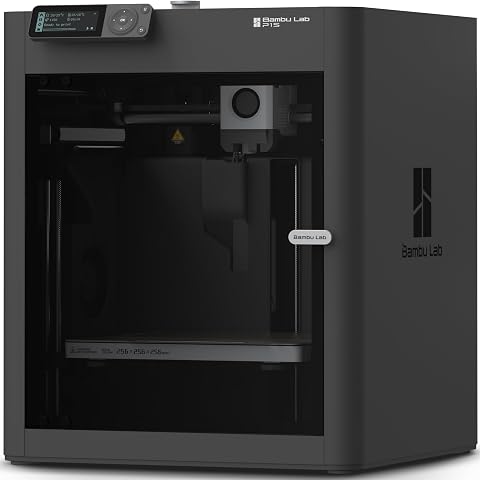 Bambu Lab P1S 3D PrinterView on Amazon →
- 7
 Anycubic Kobra X Multicolor 3D PrinterView on Amazon →
- 8
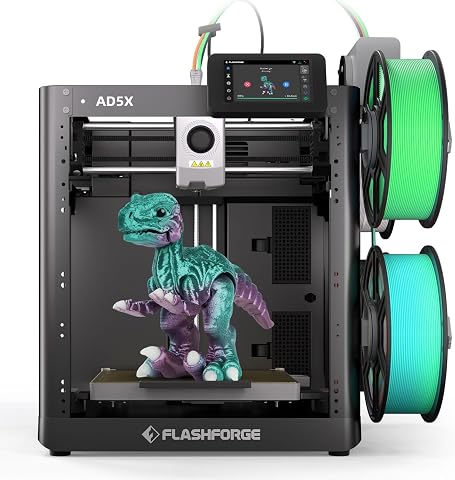 Flashforge AD5X Multi-Material 3D PrinterView on Amazon →
- 9
 Bambu Lab A1 FDM 3D PrinterView on Amazon →
- 10
 FLASHFORGE Adventurer 5M 3D Printer, All-Metal CoreXY, 600mm/s Max TravelView on Amazon →
Choosing a Printer by Workflow
The comparison matters because printers marketed for color or speed can differ in how much setup and ongoing effort they require. A filament-switching system and a multiple-toolhead design are not interchangeable workflows; buyers need to consider how often they print in several colors, how much material switching involves, and whether the added capability will be used.
Enclosure and workspace also shape the decision. The source says enclosures can help manage drafts and temperature for some materials and larger parts, but they take space and may call for ventilation attention. Open-frame machines can be easier to access and may suit routine hobby prints. The guide advises matching the printer to likely materials and actual workspace rather than paying for features based on hypothetical projects.
For readers, the result is a framework for comparing ownership tradeoffs, not proof that one model is universally best. A small, single-color project may not benefit from automated multicolor hardware or a speed-oriented design; frequent decorative or production work may make those features more useful.
Products Worth Considering

DJI Mini 3 Drone with DJI RC and 3-Axis Gimbal

LG UltraGear 27GX700A-B 27-Inch QHD OLED Gaming Monitor

Samsung 27-Inch Odyssey OLED G6 QHD Gaming Monitor (G61SH)
As an affiliate, we earn on qualifying purchases.
The Guide’s Selection Criteria
The source says its ranking favors well-rounded usefulness before narrower strengths such as an open frame, four-toolhead printing, or a standalone machine. It also distinguishes headline movement speed from practical print time: geometry, material, layer height, cooling and surface-finish requirements can all affect how long a usable part takes.
Other buying considerations include build volume and maintenance. A larger printer may occupy more bench space, while splitting a large design into joined pieces can add work and leave seams. The supplied source material ends during its discussion of work between prints, so it does not provide a complete maintenance checklist or a full account of ongoing costs.
“The P2S Combo ranks first as the most complete general-purpose bundle in this group.”
— ThorstenMeyerAI.com buying guide
Testing and Pricing Details Missing
The supplied material does not state when the printers were tested, whether the rankings reflect hands-on testing or desk research, or what criteria and weighting produced the final order. It also provides no prices, warranty terms, measured print times, noise readings, failure rates, or side-by-side sample results. The guide’s recommendations should therefore be read as its editorial assessment, not as independently confirmed performance claims.
Product configurations and availability can change. The source does not specify the exact package contents or regional variants for every model, nor does it quantify filament waste from multicolor printing. Those details could affect the cost and suitability of a printer for a particular buyer.
Verify Configurations Before Buying
Readers considering a model should check the manufacturer’s current specifications and confirm which accessories are included in the exact package available to them, especially for multicolor material systems. They should compare build volume, material compatibility, enclosure needs, workspace and routine maintenance against their own project list.
The source material does not announce a follow-up test or a future update date. A more complete comparison would need dated, consistent tests across the 10 models, along with current pricing and clearly described package configurations; until then, the ranking is best treated as a starting point for research.
Key Questions
Which printer does the guide rank first?
ThorstenMeyerAI.com ranks the Bambu Lab P2S Combo first, citing its enclosed printer and bundled multicolor material system as an all-around package. That is the guide’s recommendation, not an independently verified finding in the supplied material.
What is the difference between the P1S and P1S Combo in the guide?
The guide presents the P1S as an enclosed printer without bundled multicolor hardware and the P1S Combo as adding an AMS system. Buyers should confirm the current package contents for the version sold in their market.
Does the guide say multicolor printing is right for everyone?
No. It says multicolor can add visual accents or separate material properties, but switching materials can add print time and purge waste. Buyers who mostly make single-color functional parts may prefer a simpler setup.
Are the rankings based on published benchmark tests?
The supplied source material does not provide benchmark measurements, testing dates, or a detailed account of hands-on testing. Its rankings should be treated as editorial recommendations unless further test documentation is available.
Source: ThorstenMeyerAI.com