
Finding the best professional livestreaming camera kit can be challenging, as options vary widely in quality, features, and price. The Canon EOS R8 Content Creator Kit stands out for its full-frame quality and versatile accessories, making it a top overall choice. The NearStream Enterprise Kit offers an all-in-one professional setup ideal for larger streams, while the Content Creator Vlogging Kit for iPhone provides a more accessible entry point for beginners. These options highlight the key tradeoffs: higher-end kits deliver superior quality but come at a higher cost, whereas more affordable kits sacrifice some flexibility or features. Continue reading for a detailed breakdown of each option and how to choose the right kit for your needs.
Key Takeaways
- The top kits balance camera quality with ease of use and included accessories, ensuring professional results without excessive complexity.
- Higher-priced options tend to include full-frame sensors, advanced audio, and professional lighting, which are essential for serious broadcasters.
- Compact and beginner-friendly kits often sacrifice some upgrade potential but are ideal for content creators just starting out.
- Versatile kits with multiple lenses and comprehensive lighting setups provide flexibility, but they come with a steeper learning curve and higher investment.
- The best kits are tailored to specific use cases: whether for studio broadcasting, on-the-go streaming, or multi-camera setups, the right kit varies by buyer need.



More Details on Our Top Picks
SSE Canon PowerShot G7 X Mark III Digital Camera (Black) Complete YouTube Vlogging Bundle with Mic, 64GB Memory Card, Extra Battery, Charger, Tripod & Travel Case (Renewed)
This compact camera stands out for its combination of high-resolution 20.1MP photos and 4K video capabilities, making it ideal for creators who want a portable yet powerful device. Unlike larger mirrorless options like the Canon EOS R50, this camera offers a flip-up touchscreen and manual controls in a small form factor, perfect for on-the-go vlogging. Its included accessory bundle, with a mic and tripod, enhances its livestreaming potential, though it lacks the advanced autofocus and low-light performance of mirrorless models. The built-in Wi-Fi and Bluetooth facilitate quick sharing, but the smaller sensor means slightly less depth and detail compared to larger-sensor cameras. This pick makes the most sense for creators seeking a complete, all-in-one starter kit for streaming and social media in a lightweight package.
Pros:- High-quality 20.1MP sensor for crisp images and UHD 4K video
- Complete bundle with mic, tripod, extra battery, and travel case
- Flip-up touchscreen simplifies selfie framing and on-the-fly adjustments
Cons:- Limited low-light performance compared to mirrorless or DSLR cameras
- Smaller sensor size results in less background blur and depth
Best for: Aspiring YouTubers and travel vloggers who need a portable, all-in-one camera with comprehensive accessories.
Not ideal for: Professional livestreamers or those needing the highest low-light performance, as it trades off sensor size for compactness.
- Sensor Type:1-inch CMOS
- Megapixels:20.1 MP
- Video Resolution:2160p (4K) at 30 fps
- Screen Size:3 Inches
- Connectivity:Wi-Fi, Bluetooth
- Image Stabilization:Yes
Bottom line: This camera is best suited for content creators who want portability and a comprehensive starter kit for livestreaming and social media.
Stouchi Game Changer Mounting Kit, Fence Mount with Adjustable Sun Shade Power Bank Clip, Stable No-Shake Recording Kit for iPhone, Samsung, GoPro, Mevo Start for Baseball Softball Tennis
This mounting kit excels for outdoor sports like baseball or tennis, providing a stable, impact-resistant setup that keeps your device centered despite fence vibrations. Compared to the more versatile but bulkier Canon EOS R50 bundle, this kit is specifically designed to attach securely to chain-link fences, with dual-lock impact stabilization and an adjustable sunshade to reduce glare. Its portability and impact resistance make it ideal for active outdoor environments, though it’s less suited for indoor or tripod-based livestreams. The included power bank clip allows longer sessions without battery worries, but the setup may require some adjustment on uneven fences, which can limit perfect alignment. This product makes the most sense for coaches or parents focusing on fence-based outdoor sports coverage.
Pros:- Specialized fence mount with impact stabilization for shake-free footage
- Includes adjustable sunshade to reduce glare during daytime filming
- Impact-resistant dual-lock system for stability on rough fences
Cons:- Limited to chain-link fences; not suitable for flat surfaces or tripods
- Alignment can be tricky on uneven or bent fences
Best for: Parents, coaches, or amateur videographers filming outdoor sports at fences who need stability and impact resistance.
Not ideal for: Indoor streamers or those wanting a flexible tripod setup, as it’s fence-specific and impacts may interfere with perfect framing.
- Max Load Capacity:15 Kilograms
- Water Resistance Level:Water Resistant
- Weight:1.01 Kilograms
- Compatible Devices:iPhone, Samsung, GoPro, Mevo Start
- Adjustment Range:180°
- Additional Features:Impact stabilization, sunshade, power bank clip
Bottom line: This kit is best for outdoor sports coverage where fence mounting stability and impact resistance are priorities.
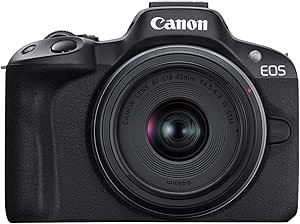
Canon EOS R50 Mirrorless Camera 24.2MP APS-C 4K Video Wi-Fi & Bluetooth Vlogging Camera Bundle with 64GB SDXC Memory Card, Slinger Shoulder Bag (EOS R50 Body Only)
This mirrorless camera offers a significant upgrade over compact options, with a 24.2MP APS-C sensor and advanced autofocus, making it ideal for professional-quality livestreams and videos. Unlike the Canon PowerShot G7 X Mark III, its larger sensor produces better background blur and low-light results, and the bundle with a shoulder bag and SD card makes it a well-rounded setup for on-the-move creators. Its 4K video at 30 fps and fast autofocus ensure sharp, smooth footage, but it forgoes the built-in flip screen of the more dedicated vlogging models like the EOS R50 Vlogging Kit. It’s a more serious choice for creators who want flexibility for both photography and high-quality livestreams, though it’s bulkier and more expensive than compact cameras.
Pros:- 24.2MP APS-C sensor provides high detail and better low-light performance
- Includes 64GB SDXC card and a shoulder bag for portability
- Excellent autofocus with eye and animal detection
Cons:- Larger size and weight compared to compact cameras
- Lacks a flip-out screen, limiting selfie-style vlogging
Best for: Semi-professional livestreamers or creators who want high-resolution photos and videos with flexibility for editing and post-production.
Not ideal for: Vloggers seeking compact, all-in-one devices or those prioritizing a built-in flip screen for quick framing.
- Sensor Size:APS-C
- Megapixels:24.2 MP
- Video Resolution:2160p (4K) at 30 fps
- Connectivity:Wi-Fi, Bluetooth
- Built-in Viewfinder:Yes
- Image Stabilization:Digital
Bottom line: This camera is ideal for creators seeking high-quality images and livestreams with versatility beyond just video.
Canon EOS R50 Vlogging Creator Kit, Hybrid Mirrorless Camera with RF-S10-18mm F4.5-6.3 IS STM Lens and Tripod Grip, Wide-angle Lens, 24.2 MP CMOS (APS-C) Sensor, Vlogging Camera, Black
This kit offers an excellent combination of a compact design and advanced features, including a 24.2MP APS-C sensor and Dual Pixel CMOS AF II, making it perfect for vloggers who need quick, reliable autofocus and versatile shooting angles. Compared to the Canon PowerShot G7 X Mark III, it provides a wider-angle RF-S10-18mm lens and a tripod grip with wireless remote, enhancing stability and control. Its 6K oversampled 4K video at 30 fps and high-speed continuous shooting up to 15 fps support dynamic content creation, though its slightly higher price and bulk compared to point-and-shoots might be a consideration. The vari-angle touchscreen allows easy framing from any angle, making it ideal for on-the-fly streaming and social media content.
Pros:- 24.2MP APS-C sensor with excellent low-light and detail capture
- Includes versatile RF-S10-18mm lens with image stabilization
- Tripod grip with wireless remote improves stability and control
Cons:- Higher price point compared to smaller compact cameras
- Battery life may be limited for extended sessions
Best for: Content creators and vloggers who want a balance of portability, autofocus, and high-quality video in a compact setup.
Not ideal for: Professional streamers needing full-frame sensor quality or users seeking a camera with a built-in viewfinder.
- Sensor Type:APS-C CMOS
- Megapixels:24.2 MP
- Video Resolution:2160p (4K) at 30 fps
- Screen Type:Vari-angle LCD
- Autofocus:Dual Pixel CMOS AF II
- Continuous Shooting:15 fps
Bottom line: This camera is best suited for vloggers who need auto-focus, flexibility, and high-quality 4K video in a portable form.
120 LED Polarized Light for Tattoo Kit with 52 mm Polarized CPL Len, Tripod Stand, LED Tattoo Lamp, Multi-Function Clip, iPad Clip Remove Glare for Taking Tattoo Photos and Live Streaming
This lighting kit is tailored for tattoo artists and livestreamers who require high-quality, glare-free images. The 120 LED beads with adjustable color temperature and polarization eliminate glare and enhance contrast, making tattoos appear more lifelike on social media. Unlike camera-focused options like the Canon EOS R50, this product is designed to improve lighting conditions for photography and video, supporting detailed close-up shots or live streaming. The versatile tripod and clips allow multi-angle adjustments, but its limited scope means it’s not suitable as a standalone livestreaming camera. The rechargeable battery supports hours of use, but its primary strength is in lighting quality rather than camera capabilities. This product makes sense for artists wanting professional-grade tattoo photos and videos.
Pros:- Eliminates glare with polarized CPL lens for clearer tattoo images
- Adjustable color temperature and polarization for perfect lighting
- Rechargeable 3000mAh battery offers 3.5 hours of continuous use
Cons:- Not a camera or video recording device itself, only a lighting solution
- Limited to photography and streaming lighting; no camera included
Best for: Tattoo artists and social media influencers needing precise, glare-free lighting for detailed work showcasing.
Not ideal for: Livestreamers seeking a camera setup or those needing advanced video recording features.
- LED Beads:120
- Color Temperature:Adjustable (Warm, Natural, White)
- Power Supply:Rechargeable 3000mAh
- Compatibility:Smartphones, Tablets, Cameras
- Adjustment Range:0° to 90° rotation
- Additional Features:Polarized lens, tripod stand, iPad clip
Bottom line: This lighting kit is ideal for tattoo artists or creators who need professional lighting to showcase detailed work and improve photo quality.
HYJ-INC Photography Umbrella Lighting Kit with 85w Led Bulb,Muslin Backdrop (White Black), Backdrop, Clips Clamp,8.5 * 10ft Photo Background Photography Stand System for Photo Video Studio Shooting
This kit stands out for its comprehensive package that combines lighting, backdrops, and support stands at an approachable price point, making it ideal for amateurs stepping into professional livestreaming or content creation. Compared to more advanced setups like the NearStream Enterprise Kit, it offers a simplified, user-friendly experience without sacrificing essential features. The included 45W LED bulbs, adjustable backdrop system, and multiple umbrellas provide versatile lighting options, while the lightweight support system is easy to set up and transport. The main tradeoff is that it lacks the high-end durability and expandability of more advanced kits, meaning it may not withstand heavy use or complex setups over time. This pick makes the most sense for those starting out in studio photography or livestreaming who need reliable equipment without a steep learning curve.
Pros:- Complete starter kit with lighting, backdrops, and support stands
- Lightweight and easy to set up, ideal for small studios or on-the-go shoots
- Includes long cords and multiple umbrellas for versatile light diffusion
Cons:- Build quality may not withstand frequent heavy use over time
- Limited expandability for more complex lighting or background needs
Best for: Beginners or hobbyists looking for an affordable, all-in-one studio lighting and backdrop setup to enhance their livestreaming quality.
Not ideal for: Experienced professionals or those requiring heavy-duty, expandable lighting systems suitable for large-scale productions.
- Light Source Wattage:45 Watts
- Backdrops:Muslin, 6×9 ft
- Support System Height Range:3 ft to 8.5 ft
- Umbrella Types:White Translucent and Black Reflector
- Color Temperature:5500 Kelvin
- Weight:18.65 pounds
Bottom line: This kit is ideal for newcomers who want a straightforward, budget-friendly option to improve their livestream backgrounds and lighting.
Canon EOS R8 Content Creator Kit, Full-Frame Hybrid Mirrorless Camera with Tripod & Stereo Microphone, 24.2 Megapixel CMOS Image Sensor, 4K Video, RF Mount, Vlogging Camera, Black
This kit earns the top spot for its blend of professional-grade image quality, advanced autofocus, and versatile features suitable for both high-end photography and livestreaming. Compared to the Canon EOS R50, the R8 offers a larger full-frame sensor, better low-light performance, and higher-quality 4K video at 60 fps, making it ideal for creators who prioritize image excellence. The included RF24–50mm lens, external stereo mic, and sturdy tripod provide a compact yet powerful package for capturing crisp visuals and clear audio in a variety of settings. Its main tradeoff is a higher price point and slightly more complex operation, which might be overwhelming for beginners. This makes the R8 kit perfect for professional content creators seeking high-quality output with room to grow.
Pros:- Full-frame 24.2 MP CMOS sensor for stunning image detail
- Exceptional autofocus with deep learning subject detection
- Includes external stereo microphone and tripod for versatile use
Cons:- Higher price may be prohibitive for entry-level users
- Slightly heavier and more complex to operate than compact cameras
Best for: Professional livestreamers, videographers, and photographers who need top-tier image quality and reliable autofocus for dynamic shooting environments.
Not ideal for: Beginners or hobbyists seeking an entry-level, budget-friendly camera system with simpler controls.
- Sensor Type:Full Frame CMOS
- Megapixels:24.2 MP
- Video Resolution:4K @ 60 fps
- Included Lens:RF24–50mm F4.5-6.3 IS STM
- Weight:2.29 pounds
- Connectivity:Wi-Fi, Bluetooth
Bottom line: This kit is ideal for experienced creators demanding professional-quality images and audio for livestreams and videos.
GVM 2 Pack LED Video Lighting Kits with APP Control, Bi-Color Variable 2300K~6800K with Digital Display Brightness of 10~100% for Video Photography, CRI97+ TLCI97 Led Video Light Panel +Barndoor
This lighting kit excels in providing adjustable, high-quality light with precise control via app and digital display, making it perfect for streamers and videographers who need versatile illumination. Compared to the basic umbrella lighting kit, the GVM panels offer a much wider color temperature range and superior color accuracy with CRI97+ ratings, ensuring natural-looking skin tones and vivid visuals. The dual-panel setup with barndoors and app control allows for quick, fine-tuned adjustments, which enhances production value significantly. The main tradeoff is that these lights are more complex to set up and operate, requiring familiarity with digital controls. This kit is best suited for creators who want professional-grade lighting with maximum customization options for varied shooting conditions.
Pros:- Bi-color adjustable from 2300K to 6800K for versatile lighting
- High color rendering index (CRI97+) for natural colors
- App control with digital display for precise adjustments
Cons:- Requires some technical knowledge to operate efficiently
- Higher cost compared to basic lighting options
Best for: Content creators, livestreamers, and videographers needing flexible, high-precision lighting setups for studio or on-location shoots.
Not ideal for: Beginners or those seeking simple plug-and-play lighting solutions without app integration or detailed controls.
- Color Temperature Range:2300K-6800K
- Brightness Control:10-100%
- LED Count:480
- CRI:97+
- Power Consumption:29W
- Weight:1 kilogram
Bottom line: This lighting kit is perfect for creators demanding professional, customizable illumination for high-quality video and livestream content.
NearStream Enterprise Kit – Business Quad Kit with VM20 StreamCam, VK40 Photography Kit, Camera Tripod, AM25X Mic, ST20 Boom Arm,AWM20T Wireless Mic, AMIX40U Audio Mixer & XLR Cables for Livestreaming
This extensive kit excels at providing a comprehensive, professional-grade livestreaming and production setup suitable for enterprise or multi-operator environments. Unlike smaller kits like the Canon EOS R8 Content Creator Kit, the NearStream Enterprise Kit offers four 4K streaming cameras, multiple microphones, lighting, and audio mixing gear, all housed in a portable but robust package. The inclusion of multiple cameras and a full audio solution makes it perfect for multi-camera streams, virtual events, or complex productions. The significant advantage is its scalability and all-in-one nature, but this comes with a higher complexity and price, making it less suitable for solo creators or small studios. For large teams or corporate live events, this kit is a game-changer.
Pros:- Includes four 4K streaming cameras with HDMI, USB, RJ45 connectivity
- Complete audio setup with wireless mics and mixers
- High-capacity lighting and professional accessories included
Cons:- High cost and complex setup process
- Requires technical expertise to operate effectively
Best for: Large organizations or production teams needing a complete, multi-camera live streaming and recording solution for professional-grade broadcasts.
Not ideal for: Solo content creators, small studios, or hobbyists with limited budget and space for such a comprehensive setup.
- Number of Cameras:Four VM20 4K
- Microphones:Four AM25X, Two Wireless AM20T
- Lighting Kit:VK40 with LED bulbs
- Audio Mixer:AMIX40U
- Connectivity:HDMI, USB, RJ45
- Weight:Varies by component
Bottom line: This kit is tailored for enterprise-level productions and teams that need a scalable, all-in-one livestreaming infrastructure.
Canon EOS R50 Mirrorless Camera with RF-S18-45mm F4.5-6.3 is STM & RF-S55-210mm F5-7.1 is STM Lenses, 24.2 Megapixel CMOS (APS-C) Sensor, 4K Video, Content Creator Vlogging Camera, RF Mount, Black
The Canon EOS R50 stands out for its combination of high-quality imaging and user-friendly features, making it ideal for professional livestreamers who want both photo and video flexibility. Compared with the Content Creator Vlogging Kit, the R50 offers superior image quality and autofocus performance, especially in varied lighting conditions. Its APS-C sensor and 24.2 MP resolution deliver sharp visuals, while 4K video with Dual Pixel CMOS AF II ensures smooth, focused footage. The kit’s lightweight design makes it easy to handle for extended sessions, though it does lack the built-in lighting and microphones that the vlog kit provides, which could be a drawback for streamers needing an all-in-one setup. This camera is perfect for creators prioritizing image quality and advanced features over complete accessory bundles.
Pros:- High-resolution 24.2 MP APS-C sensor delivers sharp, detailed images
- Excellent autofocus with Dual Pixel CMOS AF II covering 100% area
- 4K uncropped video with oversampling for high detail
- Lightweight and portable design for easy handling
Cons:- Lacks built-in lighting and microphones, requiring additional accessories for comprehensive livestreaming
- F/4.5-6.3 maximum aperture limits low-light performance compared to full professional rigs
Best for: Professional livestreamers who want high-quality video and flexible photography capabilities in a compact, lightweight package.
Not ideal for: Beginners or streamers seeking an all-in-one solution with integrated lighting and audio accessories, as they might prefer a ready-to-use kit instead of a camera-only setup.
- Sensor Type:CMOS APS-C
- Megapixels:24.2 MP
- Video Resolution:4K at 30 fps
- Autofocus:Dual Pixel CMOS AF II
- Connectivity:Wi-Fi, Bluetooth, USB-C
- Display:3-inch LCD touchscreen
- Weight:1.7 pounds
- Lens Compatibility:Canon RF Mount
Bottom line: This camera makes the most sense for creators seeking top-tier image quality and flexible shooting features in a compact form, willing to add accessories for complete livestreaming needs.
Content Creator Vlogging Kit for iPhone/Android,70-inch Auto Face Tracking Tripod for iPhone with Light and Wireless Microphones,TikTok/YouTube Starter Kit
This Vlogging Kit excels for creators who prioritize ease of use and mobility, offering an all-in-one solution with face tracking, lighting, and audio. Compared to the Canon EOS R50, this kit sacrifices image quality for convenience—perfect for quick setups and on-the-go content, especially for TikTok or live social media sessions. The 70-inch face-tracking tripod with gesture control makes hands-free operation seamless, while dual wireless microphones ensure clear audio without extra gear. Its compatibility with both iPhone and Android broadens its appeal, though it does not support advanced manual controls or high-end video resolutions like the R50. This kit is ideal for social media influencers and casual streamers who want professional-looking video without the complexity of cameras and lenses.
Pros:- Auto face tracking and gesture control for hands-free operation
- Wireless microphones with noise reduction for clear audio
- Extends up to 70 inches for versatile shooting angles
- No app download required, simple setup
Cons:- Limited video resolution (max 1080p), not comparable to high-end cameras
- Less flexible in low-light environments due to smartphone camera limitations
- Battery life and stability may vary with intensive use
Best for: Mobile content creators and social media influencers who need a portable, easy-to-use setup with automatic face tracking and high-quality audio.
Not ideal for: Professional livestreamers demanding advanced camera controls, high-resolution video, or interchangeable lenses, as this is optimized for smartphones and simplicity.
- Max Height:70 inches
- Face Tracking:Yes, gesture-controlled
- Microphones:Wireless, dual
- Video Output:1080p
- Compatibility:iPhone and Android
- Remote Control:Included
- Tripod Material:ABS, Aluminum
- Weight:0.85 kg
Bottom line: This kit is perfect for social media creators seeking a portable, automatic, and easy livestream setup that delivers professional audio and framing without technical complexity.
How We Picked
Products were selected based on their performance, build quality, and suitability for professional livestreaming environments. We prioritized kits that offer a combination of high-quality video, reliable audio, ease of setup, and expandability. Cost-effectiveness was also considered, ensuring options provide good value for different budgets. The ranking reflects a balance between overall quality and the specific needs of professional broadcasters, from solo content creators to enterprise-level setups. Each product was evaluated for how well it integrates into a comprehensive livestreaming workflow, including accessories and compatibility.Factors to Consider When Choosing Best Professional Livestreaming Camera Kit
Choosing the best professional livestreaming camera kit requires consideration of several key factors that impact both image quality and ease of use. Understanding these factors helps avoid common pitfalls, such as over-investing in features you don’t need or choosing equipment incompatible with your streaming setup. The right kit should match your skill level, production requirements, and budget, offering room to grow as your channel or business expands.Camera Sensor and Image Quality
The sensor size and resolution directly influence the clarity and depth of your video. Full-frame sensors typically deliver superior low-light performance and a cinematic look, but they often come at a higher price. APS-C sensors, common in many hybrid and mirrorless options, strike a balance between quality and affordability. For professional livestreaming, prioritize kits with at least 24MP resolution and good low-light capabilities to ensure sharp, vibrant images even in challenging conditions.
Audio Integration
Clear audio is as vital as video quality in professional streams. Kits that include dedicated microphones or support XLR connections provide cleaner sound, reducing background noise and echo. Built-in microphone quality can vary significantly; investing in external mics or audio mixers is often necessary for a polished production. Consider whether your setup requires wireless microphones, shotgun mics, or stereo options, and choose a kit that offers flexible audio options compatible with your streaming platform.
Lighting and Accessories
Lighting impacts the overall professionalism of your stream. Kits with included or compatible LED panels, softboxes, or ring lights help create consistent, flattering illumination. The ability to control brightness and color temperature adds a layer of polish. Additionally, accessories like tripods, mounts, and background setups can streamline your workflow—look for kits that offer these essentials or easy upgrade paths.
Ease of Use and Setup
For professional streams, setup time and reliability matter. Kits with intuitive controls, comprehensive instructions, and plug-and-play components save time and reduce frustration. Wireless streaming capabilities, multi-camera support, and integrated control apps can elevate your production but may require a learning curve. Balance your technical skill level with the complexity of the kit to avoid becoming overwhelmed or underpowered in your setup.
Future Expandability and Value
Professional workflows often evolve, so consider how well a kit can grow with your needs. Modular systems, additional lens options, and upgraded lighting can extend the life of your investment. While premium kits tend to be more adaptable, they also come with higher costs. Evaluate whether the features align with your long-term goals and whether the initial investment justifies future upgrades.
Frequently Asked Questions
Do I need a full-frame camera for professional livestreaming?
While full-frame cameras offer superior image quality, especially in low light, they are not a strict requirement for professional livestreaming. Many high-quality APS-C or Micro Four Thirds cameras produce excellent results at a lower cost and are easier to handle. Your choice should depend on your specific needs, such as desired image depth, lighting conditions, and budget. For most streamers, a well-chosen APS-C camera will deliver professional results without the complexity and expense of full-frame models.
Should I prioritize camera resolution or frame rate?
Both resolution and frame rate are important, but for livestreaming, smooth motion often takes precedence. A camera capable of 4K resolution provides high-detail footage, which is valuable if you plan to repurpose content or zoom in during editing. However, a higher frame rate (such as 60 fps) ensures fluid motion, vital for fast-paced content like gaming or sports. Ideally, choose a kit that offers at least 30 fps at 4K to balance detail and motion clarity for most professional applications.
Can I use a consumer camera for professional livestreaming?
Consumer cameras can work for livestreaming but often lack features vital for professional quality, such as clean HDMI outputs, reliable autofocus, or better audio options. Many consumer models also have shorter recording times or limited input/output options. If your goal is a polished stream, investing in a camera designed for content creation or professional use is advisable. These models typically provide better control, higher quality, and more durable build quality suitable for frequent use.
Is external lighting necessary for a professional setup?
External lighting significantly enhances video quality by providing consistent, flattering illumination and reducing shadows. While some cameras perform well in natural or well-lit environments, professional streams benefit from dedicated lights such as LED panels or softboxes. Proper lighting can make your image more vibrant and professional-looking, especially in controlled studio environments. Even a simple ring light or portable LED panel can dramatically improve your stream’s appearance.
How important is audio quality compared to video in professional streaming?
Audio quality is often more noticeable than video, as viewers are more sensitive to sound issues like background noise, echo, or muffled voices. Clear, high-quality audio creates a more engaging and credible experience. Investing in a good microphone or audio interface can elevate the professionalism of your stream. Remember, even the best camera can’t compensate for poor audio—prioritizing sound quality is essential for a truly professional presentation.